LLM10: Improper Output Handling

This is my running logbook for LLM10: Improper Output Handling - #10 in the OWASP Top 10 for LLM Applications (2026), and the most “classic AppSec” of the lot. Same format as the Prompt Injection log.
LLM10 is trusting the model’s output and piping it, unsanitized, into something that executes or renders it - a browser, a shell, a SQL query. Cue your old friends: XSS, SQLi, SSRF, RCE. The golden rule: treat model output exactly like untrusted user input, because thanks to prompt injection, that’s what it is. Theory in the field guide.
Deliberately-vulnerable labs. Session-specific values (CSRF tokens, lab hosts) are trimmed - the point is the sink, not the string.
Challenge 1 - Exploiting Insecure Output Handling in LLMs
Lab: Exploiting insecure output handling in LLMs ↗ · Platform: PortSwigger Web Security Academy · Track: Web LLM Attacks · Difficulty: Expert
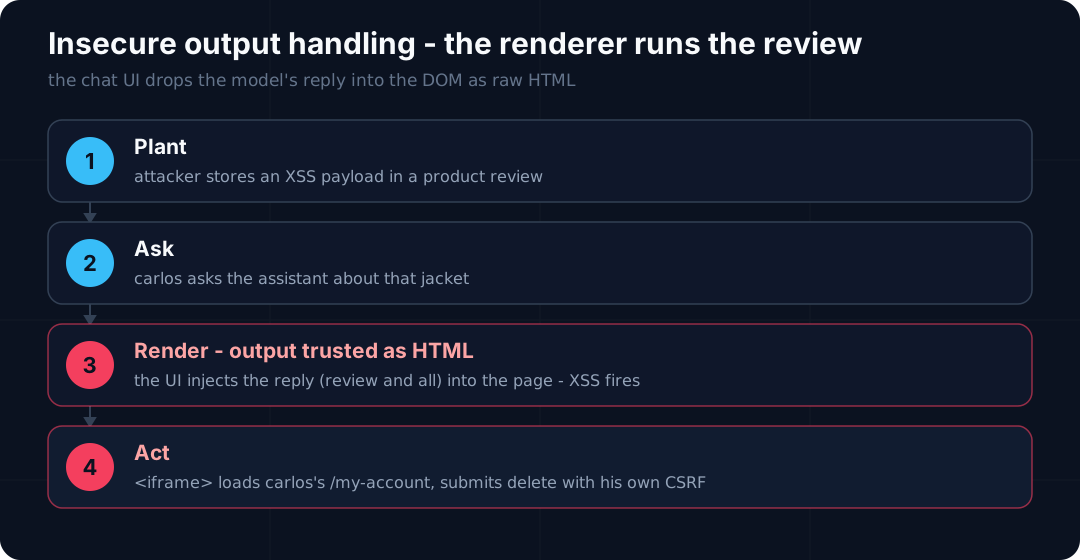
Goal again: delete carlos. But the bug has moved to the way out. The chat UI takes the model’s reply and drops it into the page as raw HTML - so anything the model echoes back, including a product review, runs in the reader’s browser. Store XSS in a review, get carlos to make the assistant echo it, and it fires in his session.
Recon: the APIs
You: what all apis do u have access?
Arti Ficial: I have access to the following APIs:
- Password Reset API
- Product Info API
Product Info returns a product’s reviews - user-submitted content the model happily reads back. Same review channel as the indirect-injection lab, but this time I’m not tricking the model - I’m targeting the thing that renders its answer.
Confirm the output is rendered as HTML
Post a review with the classic probe, then ask the assistant to show the reviews:
1 | <img src=1 onerror=alert(1)> |
Ask about product 1 → alert(1) fires. That’s the whole vulnerability confirmed: the assistant’s reply is injected into the page as raw HTML, so markup stored in a review executes. Now weaponise it.
Escalate to account deletion
The lab solves when carlos’s account is deleted, and /my-account/delete is CSRF-protected. My first instinct - hardcode a token - is a dead end, because a CSRF token from my session is useless in carlos’s:
1 | <script>fetch('/my-account/delete',{method:'POST',body:'csrf=<my-own-token>'})</script> |
The clean move is to make the victim’s browser fetch its own token. An <iframe> pointed at /my-account loads carlos’s account page - his session, his valid CSRF - and onload submits the delete form that’s already sitting on it:
1 | "<iframe src=my-account onload=this.contentDocument.forms['delete-account-form'].submit()>" |
The winning review
Stored as a review on the l33t jacket:
1 | good jacket "<iframe src=my-account onload=this.contentDocument.forms['delete-account-form'].submit()>" very good.... |
carlos frequently asks the assistant about that jacket. When he does, the assistant echoes the review, the chat UI renders the iframe, it loads his /my-account, and onload submits his delete-account-form with his CSRF token. Account deleted. Lab solved.
The star exhibit: tool output → rendered HTML
The AI log shows the payload sitting in the product_info result and getting carried into the reply verbatim:
1 | { |
The model relays it, the UI renders it, the browser runs it. One quirk worth knowing (the transcript is full of it): on many turns the model summarised the review down to “good jacket” and stripped the markup, and nothing fired. The payload only lands when the model echoes it intact - so a short, summary-resistant payload and a bit of persistence both matter.
Why it worked
- The chat UI treats model output as trusted and injects it into the DOM as HTML - the exact anti-pattern LLM10 is named for.
- Reviews are attacker-controlled content the model relays, so “the model said it” is really “the attacker said it” (the bridge to LLM01).
- The kill is a stored XSS → CSRF chain: the iframe reads the victim’s own page for a valid token, sidestepping naive CSRF protection.
Mapping to OWASP
| Entry | How it shows up here |
|---|---|
| LLM10 Improper Output Handling | The chat UI renders the model’s output as raw HTML - stored XSS. |
| LLM01 Prompt Injection | The payload arrives via an untrusted product review the model echoes back. |
…and underneath it’s plain stored XSS + CSRF, revived because model output went to the browser unencoded.
How you’d fix it
- Treat model output as untrusted. HTML-encode it before rendering; never inject it as raw HTML.
- Context-aware output encoding plus a strict Content-Security-Policy to blunt anything that slips through.
- Sanitise review content on input too (defence in depth).
- Don’t lean on CSRF tokens when an attacker can run script same-origin - the real fix is not rendering attacker HTML at all.
Takeaway
The model didn’t get hacked here - the renderer did. This is the most classic-AppSec entry on the whole list: the instant you pipe LLM output into a browser (or a shell, or SQL) without encoding it, every old injection bug walks back in the front door. Model output is user input wearing a badge.
More Improper Output Handling challenges
Next in the queue - each gets its own section here as I clear it:
- Cupid’s Matchmaker - THM, free - web exploitation against a matchmaking service (coming soon)
- Spring AI: CVE-2026-22738 - free - model-reachable input → RCE (also LLM04 Supply Chain) (coming soon)
- LLM Output Handling and Privacy Risks - THM VIP (coming soon)
This one’s from PortSwigger’s Web LLM Attacks track - and it completes the four-lab set. Reach out.
- Title: LLM10: Improper Output Handling
- Author: Sebin Thomas
- Created at : 2026-08-22 10:00:00
- Updated at : 2026-09-09 20:02:17
- Link: https://blog.sebinthomas.in/2026/08/22/owasp-llm10-improper-output-handling/
- License: All Rights Reserved © Sebin Thomas