Building a Personal Cybersecurity RAG for Pentesting, Security Research, and Hands-on Testing
Building a Personal Cybersecurity RAG for Pentesting, Security Research, and Hands-on Testing
A practical build log covering the architecture, ingestion, hybrid retrieval, MCP integration, Hermes Agent, and an initial evaluation using Hack The Box challenges.
Why I built this
I wanted a personal cybersecurity knowledge assistant that could do more than answer generic questions. The goal was to make my own pentest notes, research, write-ups, methodologies, scripts, and security references searchable by an AI agent during real security work, research, and hands-on testing. I want the same knowledge layer to be useful across web and API assessments, infrastructure and Active Directory testing, cloud reviews, mobile security, and emerging areas such as LLM application security.
This is not intended to be an HTB-only solver or a generic chatbot. The idea is to retrieve relevant technical material from a private knowledge base before the language model generates an answer, then use that context alongside evidence gathered during an assessment.
The system is intended to support an authorized security testing and research workflow, including:
- Web application, API, Active Directory, cloud, and LLM security research.
- Searching notes, commands, scripts, CVE references, and testing methodologies.
- Supplying relevant context to an agent instead of relying entirely on model memory.
- Exposing retrieval functions through MCP so an external agent can call them.
- Supporting test planning, technical investigation, validation, and troubleshooting during authorized engagements.
- Helping correlate observed behaviour with known vulnerability classes, techniques, and defensive controls.
- Measuring the current setup using a repeatable set of authorized HTB challenges.
This is an ongoing personal project. The current implementation is a prototype. Its intended scope is broader than CTFs and labs: it is being developed as a personal assistant for penetration testing and security research. However, the evaluation described in this post was performed only on HTB challenges. HTB is the initial test set used to get a measurable baseline; it is not evidence of performance in client engagements or production assessments.
Project scope vs. current evaluation
The intended use case is broader than HTB: this is a personal cybersecurity RAG designed to support authorized penetration testing, security assessments, technical research, and hands-on learning. It can retrieve relevant knowledge for web and API testing, Active Directory and infrastructure assessments, cloud security, mobile testing, and LLM application security.
The current evidence is narrower. I have tested the workflow only against the five HTB challenges listed later in this post. Those runs are an initial benchmark to understand latency and agent behaviour. They are not a validation of the system on client environments, and they do not establish detection coverage or pentest effectiveness.
Architecture
The system has two main parts:
- Knowledge and retrieval infrastructure - ingestion, embeddings, vector search, keyword search, and answer generation.
- Agent integration - an MCP server exposes RAG functions to Hermes Agent through an SSH tunnel.
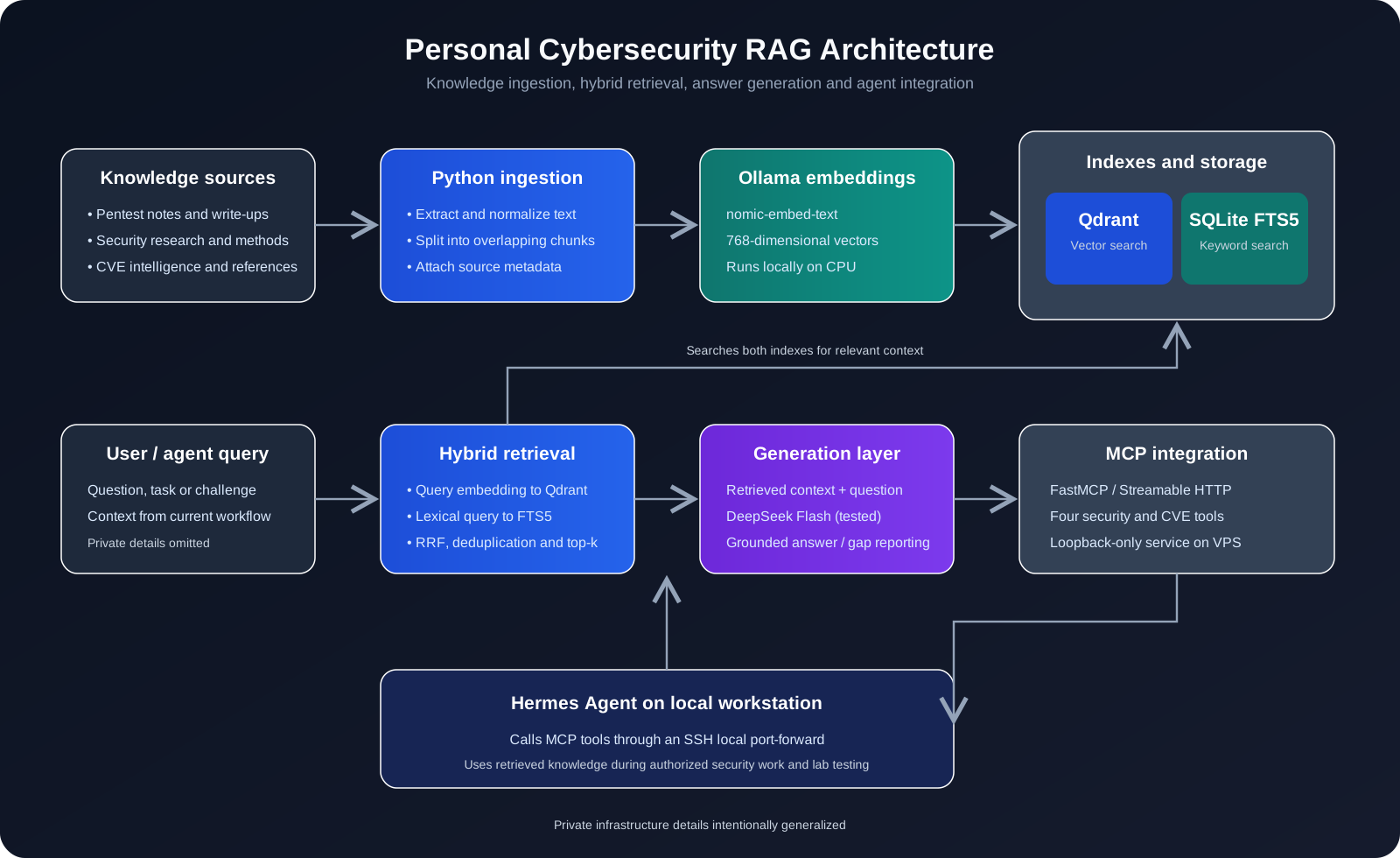
Request flow
- Documents are collected from private knowledge sources.
- The ingestion pipeline extracts text and splits it into overlapping chunks.
- Ollama generates a 768-dimensional embedding for each chunk.
- Qdrant stores vectors with their text and metadata.
- SQLite FTS5 provides a separate full-text keyword index.
- Hermes sends a question to the MCP server.
- The retrieval layer searches Qdrant and FTS5.
- Results are combined, deduplicated, and selected as context.
- The generation layer produces an answer grounded in the retrieved material.
- The answer is returned to Hermes.
The model does not need to remember every technique. The retrieval layer can provide relevant material at request time.
Technology stack
| Component | Role |
|---|---|
| Debian Linux VPS | Hosts the RAG services |
| Python 3.13 | Ingestion, retrieval, and MCP implementation |
| Ollama | Local embedding generation |
nomic-embed-text |
768-dimensional text embeddings |
| Qdrant | Vector database |
| SQLite FTS5 | Keyword / full-text search |
| DeepSeek Flash | Answer generation in the tested setup |
| MCP Python SDK / FastMCP | Exposes RAG functions to agents |
| Hermes Agent | Local agent that calls the MCP tools |
| SSH port forwarding | Private connection from workstation to VPS |
| Docker Compose | Runs Qdrant |
| Cloudflare R2 | Considered for source-object storage / backup; not required for the core retrieval flow described here |
The VPS used for this prototype has 4 vCPU, around 8 GB RAM, SSD storage, and no GPU. Embeddings therefore run CPU-only.
1. Preparing the VPS
The initial project layout separated knowledge, skills, ingestion, retrieval, configuration, storage, and logs:
1 | |
Private repository names, hostnames, account details, and filesystem paths are intentionally generalized.
Base packages
1 | |
Python environment
1 | |
Representative Python dependencies:
1 | |
The MCP server also uses the MCP Python SDK:
1 | |
During development, I encountered a Qdrant client/server compatibility warning after installing a newer client. I aligned the Python client with the server release line:
1 | |
For a reproducible deployment, dependency versions should be pinned and tested together.
2. Qdrant
Qdrant stores embedding vectors and their associated text payloads. The collection uses cosine similarity and a vector size of 768 to match the embedding model.
The service is bound to localhost rather than exposed directly to the public internet. The API key is loaded from an environment file.
A simplified Docker Compose example:
1 | |
Start and inspect the service:
1 | |
Check collection status without putting the API key directly in shell history:
1 | |
Collection configuration:
- Vector size:
768 - Distance metric:
Cosine - Payload: source identifier, chunk index, text, and content hash
3. Ollama and embeddings
The embedding model is separate from the language model that writes the final answer. Its job is to convert text into vectors that capture semantic similarity.
I used nomic-embed-text, which produces 768-dimensional embeddings.
After installing Ollama:
1 | |
A quick test:
1 | |
Or through Python:
1 | |
The expected embedding dimension for this model is 768. The model runs locally, so document text does not need to be sent to the generation provider merely to create embeddings.
4. Document ingestion
The ingestion pipeline extracts text from supported files, splits it into overlapping chunks, generates embeddings, and stores the vectors and metadata in Qdrant. PDF parsing is supported through pypdf; HTML parsing can use BeautifulSoup.
Chunking
The working configuration used approximately:
- Chunk size: 1,200 characters
- Overlap: 200 characters
Overlap helps avoid losing context when a relevant explanation or command falls near a chunk boundary.
Each indexed point stores metadata similar to:
1 | |
A content hash can help identify unchanged material and avoid unnecessary reprocessing when incremental ingestion is implemented.
Simplified ingestion core
This is a representative example of the pipeline, not a copy of the complete private implementation:
1 | |
The production ingestion code also needs deterministic point IDs, update/delete handling, duplicate prevention, error handling, and source-version tracking.
Corpus size
The initial test indexed a single small Markdown note. I then connected a much larger private security knowledge collection.
During the ingestion run, the selection process reported 6,236 Markdown files. The broader corpus later reached approximately 60,194 indexed chunks. These figures describe the project at the time of the experiment, not a permanently audited count.
5. Hybrid retrieval: Qdrant + SQLite FTS5
Vector search is useful when a question and a document use different wording but describe the same concept. It is not always ideal for exact technical strings.
Security work frequently depends on exact identifiers:
- CVE numbers
- HTTP headers
- API routes
- Registry keys
- Windows attributes
- Function names
- Error messages
- Tool names and command-line flags
A semantic search for a specific Active Directory attribute may return generally related delegation material without returning the exact attribute name or command.
To improve this, I added SQLite FTS5 as a keyword retrieval path.
The retrieval layer has two complementary paths:
- Dense retrieval: embed the question and query Qdrant for semantically similar chunks.
- Lexical retrieval: query SQLite FTS5 for exact words and technical identifiers.
The results are combined using a Reciprocal Rank Fusion (RRF)-style approach. This avoids directly comparing raw vector similarity scores with full-text ranking scores.
Simplified RRF illustration:
1 | |
This is illustrative pseudocode. The actual implementation also needs deduplication, payload preservation, missing-result handling, and sensible limits.
Vector search can find conceptually similar passages. Keyword search can find exact strings. Combining them improves the chance of retrieving both the explanation and the exact technical reference.
The FTS5 integration also replaced a slow full-collection scroll-based keyword search from the earlier implementation. Direct retrieval tests were around 0.22-0.33 seconds in the test environment. This is a local measurement, not a latency guarantee.
6. Answer generation
The retrieval layer finds relevant context. The generation layer uses that context to construct an answer.
1 | |
The RAG prompt should make the model distinguish between:
- Information supported by retrieved material.
- Reasoning based on current challenge evidence.
- Missing information that needs another retrieval query or direct verification.
A weak retrieval match should not become a confident answer. If the knowledge base does not contain the requested detail, the agent should say so and identify the gap.
This mattered during Active Directory testing. A query about Kerberos delegation returned related material but did not always include the exact procedure or commands for the specific delegation type. The correct behaviour is to flag the coverage gap, not invent missing steps.
7. MCP integration
I exposed the retrieval functions to an AI agent using the MCP Python SDK and FastMCP.
The server exposes four tools:
| MCP tool | Purpose |
|---|---|
search_security_knowledge |
Search the cybersecurity knowledge base |
search_cves |
Search indexed CVE intelligence |
get_cve_details |
Retrieve a specific CVE record |
ask_security_rag |
Retrieve context and generate a detailed security answer |
The server uses Streamable HTTP and listens on loopback on the VPS. It is not intended to be publicly exposed.
Simplified server structure:
1 | |
The exposed tool names match the MCP interface. Internal helper names above are illustrative placeholders.
Run the MCP service
The service is kept running in a tmux session:
1 | |
Verify the listener:
1 | |
Connect from the local workstation
I connect to the VPS through SSH local port forwarding:
1 | |
Then register the MCP endpoint with Hermes:
1 | |
Test the connection:
1 | |
The successful test discovered all four tools. The SSH tunnel lets the local agent reach the private MCP service without publishing its port to the internet.
8. Using Hermes Agent during security testing
With MCP connected, Hermes can call the RAG tools during a task. The same interaction pattern is intended to apply to authorized penetration tests, security reviews, research, and lab work.
The RAG should not replace reconnaissance, manual analysis, or validation. It should act as a context and research layer: inspect the available evidence, retrieve focused material related to the technologies and behaviour observed, and help formulate testable hypotheses.
A general assessment workflow:
- Confirm the assessment scope, rules of engagement, and permitted test windows.
- Review supplied documentation, architecture, source code, and available test accounts.
- Perform scoped reconnaissance and identify exposed assets, technologies, endpoints, and trust boundaries.
- Ask the RAG for material relevant to the observed technologies, behaviours, and potential vulnerability classes.
- Compare retrieved guidance with application responses, source code, configuration, and other collected evidence.
- Form a specific hypothesis and validate it with controlled tests.
- Confirm impact, assess exploitability, and preserve reproducible evidence.
- Record the test result and map it to the appropriate reporting format.
A representative instruction for an authorized assessment:
1 | |
For HTB, I use a narrower solve-only variation that tracks flag retrieval time and target request count. The benchmark below uses that lab-specific workflow.
9. Initial evaluation: HTB benchmark
The project is designed for broader penetration-testing and security-research use. To get an initial, repeatable signal before evaluating it in other settings, I tested it against five HTB web challenges across different difficulty levels. This is the only testing dataset reported in this post. No client penetration test, production application, or live engagement has been used to validate the system’s effectiveness, and the timings below should not be interpreted as pentest performance metrics.
The timing starts at the challenge-solving workflow and ends when the flag is retrieved. It excludes instance/IP setup overhead. The phases are:
- Download: obtain the challenge archive.
- Review: inspect supplied files and application structure.
- Analysis: reason about the vulnerability and plan the approach.
- Exploit: perform live testing and retrieve the flag.
- Total: end-to-end time for the measured workflow.
Results
| Challenge | Difficulty | Download (s) | Review (s) | Analysis (s) | Exploit (s) | Total (s) |
|---|---|---|---|---|---|---|
| Flag Command | Very Easy | - | 8.6 | 10.4 | 2.6 | 22 |
| TreaPortal | Easy | 2.7 | 4.3 | 35.3 | 4.1 | 51 |
| Carta | Medium | 10.2 | 110.9 | 103.1 | 224.1 | 448 |
| Resizer | Hard | 4.0 | 95.0 | 157.0 | 53.0 | 309 |
| ArtificialUniversity | Insane | 6.1 | 155.2 | 287.9 | 1,172.0 | 1,621 |
| Total | 23.0 | 374.0 | 593.7 | 1,455.8 | 2,451 |
Combined measured time: 2,451 seconds, or 40 minutes 51 seconds.
Timing-data note: the supplied TreaPortal phase values add up to 46.4 seconds, while its reported total is 51 seconds. The table preserves the reported total rather than silently changing it. Consequently, the summed phase columns do not reconcile exactly with the sum of the reported challenge totals. Flag Command’s phase values are also rounded.
These are five individual HTB runs, not a statistically rigorous benchmark. They provide an early baseline for the lab workflow only. They do not measure vulnerability discovery rate, finding quality, assessment coverage, false-positive rate, or effectiveness during a client penetration test. They also do not prove that this RAG is faster or better than another model or agent.
Challenge notes
Flag Command - Very Easy - 22 seconds
The key was exposed through the application’s /api/options endpoint. Client-side JavaScript revealed the relevant command, and the final API interaction returned the flag.
The lesson: inspect the application’s own client-side logic before trying generic payloads.
TreaPortal - Easy - 51 seconds
The issue involved an array-typed query parameter bypassing a check that expected typeof username === 'string'.
This is a useful example of why type assumptions and framework parameter parsing matter. The application expected a string, but the request could supply a different type.
Carta - Medium - 7 minutes 28 seconds
This challenge required source review and exploit design. The live phase involved testing a Content Security Policy nonce bypass empirically and ensuring the flag retrieval happened through a same-origin interaction.
Identifying a plausible payload is not the same as validating the full browser-side execution and data-retrieval path.
Resizer - Hard - 5 minutes 9 seconds
The source review exposed a native helper component. The exploit involved a cross-compiled shared library and a controlled worker lifecycle.
The live phase was comparatively short once the helper was understood: one write operation followed by a forced worker recycle.
ArtificialUniversity - Insane - 27 minutes 1 second
This was the most expensive run. The investigation identified three relevant primitives:
- A checkout flow that trusted a client-controlled price.
- A gRPC
UpdateServiceoperation. - An
eval(price_formula)execution path.
The main challenge was reaching the gRPC functionality and validating the full chain. The live phase took 1,172 seconds and involved approximately 30 admin-browser bot round-trips, each taking around 23-84 seconds. It also required constructing and locally validating a raw HTTP/2 gRPC frame and a PDF.js payload.
Important caveat: the 1,172-second live phase is inflated by blind bot-driven testing. Each probe required an admin-browser run whose behaviour could not be inspected directly. The run also included a container restart after a recursive-bot mistake. A cleaner execution is estimated at roughly 4-5 minutes of understanding, plus bot execution time. That estimate was not separately measured.
10. What the HTB evaluation tells me
What is working
- My own security material is available to the agent at query time.
- Hermes can retrieve techniques instead of relying only on model memory.
- Exact CVE and technical-reference retrieval is available through dedicated tools.
- The workflow encourages evidence-driven testing and focused hypotheses.
- Solve time and HTTP request count provide a baseline for comparison.
What needs improvement
- Retrieval quality is inconsistent. A semantically related chunk is not necessarily the exact procedure required.
- Chunk boundaries can split commands or explanations.
- Similar documents can dominate the top results.
- Hybrid retrieval needs better ranking, filtering, and deduplication.
- The agent can spend too long reasoning or following weak hypotheses.
- Browser automation and external bot latency can dominate challenge time.
- The benchmark contains only five challenges and one tested model configuration.
This is a useful prototype, not an autonomous pentester. The HTB results show how the current setup behaved on five selected lab challenges; they do not establish how well it performs across real-world applications, infrastructure, cloud environments, mobile applications, or client engagements.
11. Security and privacy
Because this is a personal security knowledge system, I kept the infrastructure private.
The deployment approach includes:
- Bind database and MCP services to loopback where possible.
- Reach private services through SSH port forwarding.
- Keep API keys and provider credentials in environment variables.
- Exclude
.env, local databases, logs, and virtual environments from Git. - Use placeholders in example configuration files.
- Avoid publishing signed challenge download URLs, access tokens, private hostnames, or target addresses.
- Review source material before sending it to an external generation provider.
A basic .gitignore:
1 | |
A private repository is not a substitute for secret management. Credentials should never be committed. If a real key is exposed, rotate it rather than only deleting it from the latest commit.
12. Current status and next steps
The prototype currently includes:
- A VPS-hosted Python RAG backend.
- Local CPU-based embedding generation with Ollama.
- A 768-dimensional Qdrant vector collection.
- A SQLite FTS5 keyword index.
- Hybrid retrieval with rank fusion.
- A DeepSeek Flash generation path.
- An MCP server exposing four security tools.
- A local Hermes connection through an SSH tunnel.
- An early five-challenge HTB evaluation used only as an initial performance baseline.
Next improvements:
- Retrieval evaluation: build fixed security questions with expected source passages and measure recall at different
kvalues. - Better chunking: use Markdown-aware and code-aware chunking so commands, tables, and procedures stay together.
- Metadata filtering: filter by topic, source type, technology, tool, and document quality.
- Reranking: add a reranker after initial vector and lexical retrieval.
- Context expansion: retrieve adjacent chunks only when they belong to the same source and are relevant.
- Source-grounded answers: require source references internally while keeping private paths out of user-facing output.
- CVE pipeline: improve exact CVE lookup, affected-version filtering, and KEV enrichment.
- Broader evaluation: after the HTB baseline, evaluate the workflow against controlled web, API, Active Directory, cloud, mobile, and LLM-security test environments. Record the scope and methodology for each dataset.
- Model benchmarking: repeat the same HTB challenges and any future controlled test cases with different models and agent configurations using identical metrics.
- Observability: log retrieval latency, generation latency, tool calls, context size, and failure reasons separately.
- Assessment utility metrics: measure retrieval relevance, evidence quality, validation success, time saved, false positives, and analyst review effort rather than relying only on task completion time.
- Reproducibility: pin dependencies, add tests, and document deployment.
13. Model performance
All five benchmark runs used the same tested model configuration: DeepSeek Flash through Hermes Agent.
I have not run the same benchmark against other models. Another model may perform differently, but I do not have comparative data to support a claim that it would be faster or slower.
The purpose of this experiment is to establish a baseline and improve the system based on observed bottlenecks rather than assumptions.
Conclusion
This started as an attempt to make my cybersecurity notes useful during hands-on work. It has grown into a small RAG infrastructure with vector search, keyword retrieval, a generation layer, MCP integration, and an agent-driven HTB benchmark.
The five HTB challenges took a combined 40 minutes and 51 seconds under the timing method described above. The easier challenges were quick, while the harder ones exposed the real costs: source review, exploit design, browser automation, and multi-step validation.
That result is a lab benchmark, not a claim about client pentest speed or coverage. The broader goal is to make the knowledge base useful throughout authorized security work: preparing tests, researching unfamiliar technologies, validating hypotheses, and documenting evidence. The system is not perfect, and retrieval quality and agent execution still need work. The HTB runs give me a starting point for improving it; broader controlled evaluations are still required before drawing conclusions about its value in professional engagements.
This is an ongoing experiment. The most useful result so far is not the fastest flag - it is having a repeatable system that I can measure, debug, and improve.
Appendix A - Operational commands
These are the main commands used in setup and day-to-day checks. Replace placeholders with your own values and keep secrets out of shell history.
Activate the environment
1 | |
Check Ollama
1 | |
Check Qdrant
1 | |
Check collection status
1 | |
Run ingestion
1 | |
Run a retrieval test
1 | |
Start or inspect MCP
1 | |
If the session already exists, attach instead of starting a duplicate:
1 | |
Test MCP from the local machine
1 | |
Recreate the SSH tunnel
1 | |
Inspect VPS resources
1 | |
Appendix B - Benchmark template
For each new challenge, record:
1 | |
Use consistent measurement rules:
- Start at the first target HTTP request.
- Stop when the actual flag response is received.
- Count target HTTP requests consistently.
- Exclude instance setup, archive download, cleanup, and write-up time if comparing with the table above.
- Record browser-bot round-trips separately when they dominate the run.
- Do not compare different models unless the challenge, prompts, tools, target conditions, and timing method are controlled.
Disclosure: This post intentionally replaces private infrastructure details, server addresses, account identifiers, repository names, skill paths, and credentials with generic descriptions or placeholders. Code snippets are representative examples, not a complete release of the private source code.